Executive Takeaway: The Direct Answer
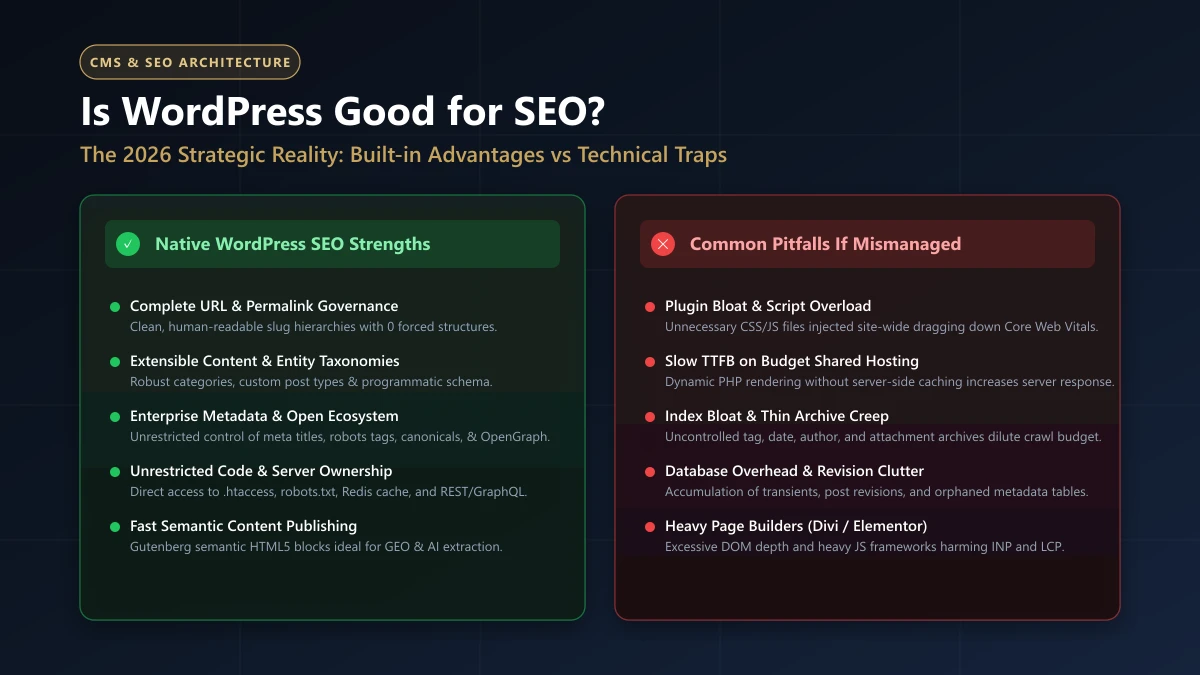
Yes, WordPress is exceptionally good for SEO. It powers more than 43% of the modern web and commands over 62% of the content management system (CMS) market share. WordPress offers unconstrained technical control over permalinks, canonical tags, semantic HTML5 structuring, content taxonomies, and programmatic schema graphs. However, WordPress does not rank websites automatically. It provides an optimal open-source chassis; your ultimate search visibility depends entirely on your server infrastructure, theme lightness, Core Web Vitals optimization, and execution of advanced Technical SEO services.
Among marketing executives, CTOs, and digital entrepreneurs, few debates recur with as much intensity as selecting the right content management system for organic search visibility. Stakeholders routinely ask: "Is WordPress good for SEO in 2026, or has modern headless architecture and proprietary SaaS platforms rendered it obsolete?"
The short answer is unequivocal: WordPress remains one of the most powerful, battle-tested, and algorithm-friendly foundations on the internet. High-growth enterprises, media giants (such as TechCrunch and Time Inc.), and hyper-scaling B2B software companies continue to rely on WordPress as their primary organic engine. Yet, behind this widespread adoption lies a critical dichotomy: a poorly configured WordPress deployment can destroy crawl efficiency and crash Core Web Vitals, while a precision-engineered WordPress architecture can dominate enterprise Search Engine Results Pages (SERPs).
To understand how search engines evaluate WordPress, you must look beyond surface-level plugin recommendations. In this comprehensive guide, we unpack the mathematical and architectural realities of WordPress SEO, dissecting server-level execution, database overhead, taxonomy cannibalization, Core Web Vitals (LCP, INP, CLS), and the burgeoning field of Generative Engine Optimization (GEO).
How Google and Modern Search Engines Evaluate CMS Platforms
To dispel the most persistent myths surrounding Content Management Systems, we must first establish how search crawlers interact with web applications. Many novice webmasters assume Google grants inherent algorithmic preference to specific brands or platforms.
Google does not care what software powers your database. As documented in official engineering guidelines by Google Search Central, Googlebot is platform-agnostic. The web rendering service (WRS) processes your final rendered Document Object Model (DOM), CSS, JavaScript, and HTTP response headers. Google evaluates:
- Crawl Accessibility & Indexability: Can Googlebot discover clean HTTP 200 responses, follow semantic
<a href>anchors, and parse XML sitemaps without hitting redirect loops or JavaScript crawl traps? - Information Architecture & Taxonomy: Are URLs organized into coherent thematic silos that reinforce topical authority?
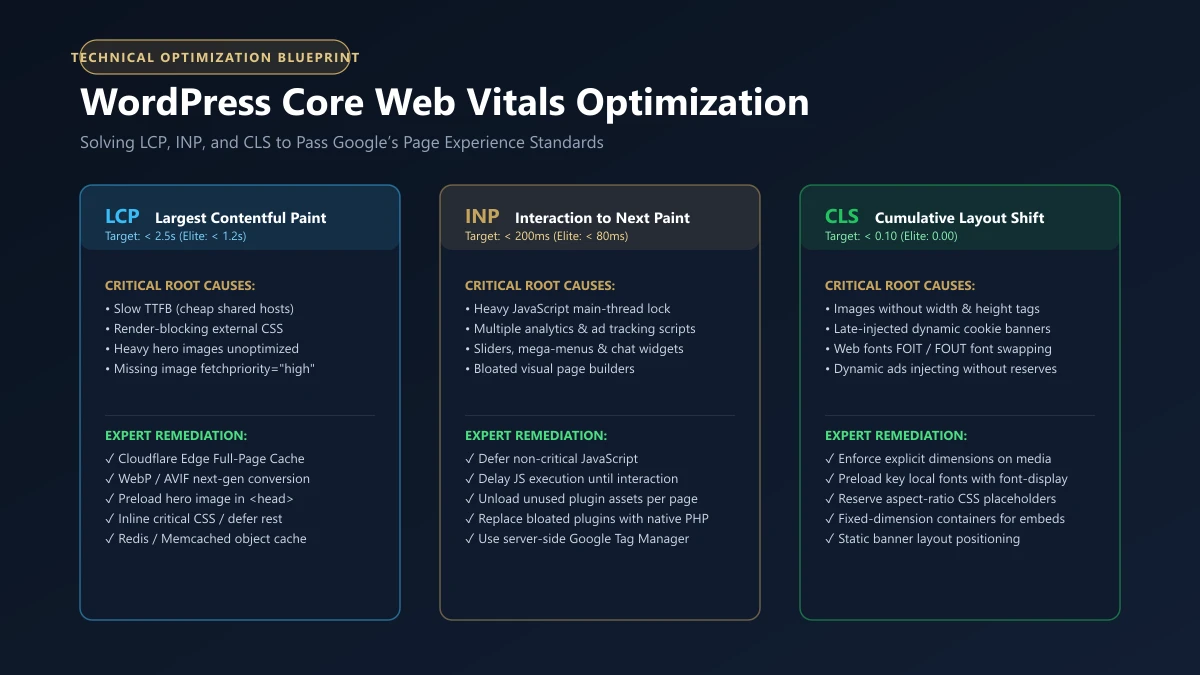
- Render Speed & Page Experience: Does the site satisfy Google's Core Web Vitals thresholds (Largest Contentful Paint, Interaction to Next Paint, Cumulative Layout Shift)?
- Entity & Schema Extraction: Does the page deliver valid JSON-LD structured data to feed Google's Knowledge Graph and generative AI search models?
The reason WordPress consistently dominates organic rankings is not because Google's algorithm possesses a built-in "WordPress bonus." Rather, it is because WordPress provides an uninhibited, open-source canvas where every single one of these technical factors can be manipulated, customized, and perfected. Proprietary closed-source platforms (such as Shopify or Wix) impose strict boundaries on what engineers can alter. In contrast, WordPress grants root-level autonomy over every byte delivered across the wire.
Native WordPress Advantages: Why WordPress Excels at SEO
According to authoritative web technology research published by W3Techs, WordPress powers over 43.5% of all active websites and holds a commanding 62.8% market share of content-managed systems worldwide. This global dominance is fueled by structural advantages engineered specifically for publishing and discovery:
1. Absolute Permalink & URL Hierarchy Control
Unlike many hosted platforms that force arbitrary subdirectories into your URL architecture (such as Shopify's rigid /products/, /collections/, and /pages/ constraints), WordPress allows 100% granular permalink customization. You can design clean, human-readable slugs directly aligned with keyword intent, such as:
https://example.com/services/technical-seo/
https://example.com/blog/is-wordpress-good-for-seo/
Clean permalinks eliminate visual noise, improve click-through rates (CTR) in search results, and establish strict parent-child semantic relationships that crawlers rely upon to gauge topical context.
2. Native Semantic HTML5 Code Base
Modern WordPress core releases (specifically WordPress 6.x and beyond) output rigorous, semantic HTML5 code. Standard block themes automatically generate appropriate document markup: single <h1> tags for document titles, logical <nav>, <header>, <main>, <article>, <section>, and <footer> boundaries, and automatic <figure> wrapping with caption attributes for embedded media. This semantic precision allows search crawlers and large language models (LLMs) to ingest your content without syntactic ambiguity.
3. Sophisticated Taxonomy & Content Architecture
Search engines reward websites that demonstrate deep, structured expertise across a topical subject. WordPress is fundamentally built upon relational taxonomies:
- Hierarchical Categories: Ideal for building broad pillar themes and topical silos.
- Non-Hierarchical Tags: Useful for cross-referencing granular concepts across disparate silos.
- Custom Post Types (CPTs) & Custom Taxonomies: Allow businesses to create custom directories, case studies, portfolios, and service listings with specialized metadata templates.
When properly planned, this taxonomy engine establishes natural internal linking hubs that distribute PageRank and topical context throughout your digital ecosystem. For a deeper understanding of how internal link architecture compounds organic reach, review our guide on what is the objective of SEO.
4. Dynamic Native XML Sitemaps
Since version 5.5, WordPress includes an automated, native XML sitemap generator (/wp-sitemap.xml). It automatically updates whenever new pages, posts, custom post types, or taxonomies are published, providing search engine bots with immediate discovery vectors. While advanced SEO plugins typically replace this with more customizable sitemap systems, the native integration ensures that no WordPress site operates without fundamental crawl indexing pathways.
5. The World's Most Powerful SEO Plugin Ecosystem
The WordPress plugin repository offers unrivaled search optimization tooling. Solutions like Rank Math, Yoast SEO, and SEOPress allow non-developers to execute sophisticated on-page and technical optimizations in minutes:
- Custom title tags and meta descriptions with dynamic global variables.
- Granular robots meta tags (
noindex,nofollow,noimageindex,max-snippet). - Automated self-referencing and custom canonical URL overrides.
- 301 and 308 redirect managers with automated 404 error tracking.
- Social card open graph tags and Twitter card protocols.
- Automated, multi-type Schema.org JSON-LD graph generation.
To verify whether your current on-page elements meet modern algorithmic standards, leverage our detailed On-Page SEO Checklist.
The Dark Side of WordPress: Common SEO Pitfalls & Why Sites Fail
If WordPress is so inherently capable, why do thousands of WordPress websites languish on page five of Google? The answer lies in the classic engineering axiom: flexibility without discipline breeds chaos.
Because WordPress makes it trivial to install plugins, import themes, and create content, inexperienced operators inadvertently create severe technical bottlenecks that undermine organic performance:
1. Severe Plugin Bloat & Script Clutter
A standard WordPress installation contains zero frontend bloat. However, when site owners install 35+ disparate plugins to handle minor design features (social sharing widgets, contact forms, sliders, animated popups, marketing pixels), each plugin frequently enqueues its own standalone CSS and JavaScript files across every page of the website—even on pages where the plugin isn't active!
This triggers massive render-blocking asset loads, inflates total page weight beyond 5MB, and locks the browser's main JavaScript thread. Under Google's updated page experience signals, this directly destroys your Interaction to Next Paint (INP) and Largest Contentful Paint (LCP) scores.
2. The Heavy Page Builder Conundrum (Divi, Elementor, WPBakery)
Visual drag-and-drop page builders revolutionized web design for non-coders, but they come with a steep technical SEO price tag. Many legacy builders generate horrific "div soup"—deeply nested Document Object Model structures exceeding 1,500 to 3,000 DOM nodes per page.
Excessive DOM depth strains mobile CPU processing, delays stylesheet calculation, and makes it harder for search crawlers to extract primary content entities. Sites built with bloated builders often struggle to pass Google's Core Web Vitals assessments without aggressive caching layers.
3. Crawl Budget Waste & Index Bloat (Thin Taxonomies)
By default, WordPress automatically creates archive pages for:
- Every single tag created (e.g.,
/tag/seo-tips/). - Every single author profile (e.g.,
/author/admin/). - Every single date archive (e.g.,
/2026/11/). - Every media asset uploaded (attachment pages).
If an author writes 50 blog posts but creates 300 arbitrary tags, Googlebot will crawl 300 near-empty tag pages containing duplicated snippets of the same 50 articles. This creates catastrophic thin content and keyword cannibalization, wasting your site's crawl budget and diluting algorithmic topical focus. To protect your site against these architectural flaws, study our detailed analysis on how duplicate content affects SEO and how to fix it.
4. Budget Shared Hosting & Sluggish TTFB
WordPress is a dynamic CMS powered by PHP and a MySQL/MariaDB database. Every time an uncached request hits your server, WordPress executes PHP scripts, queries database tables, and dynamically constructs the HTML response.
When hosted on budget $3/month shared hosting servers, CPU resources are throttled. This results in Time to First Byte (TTFB) measurements exceeding 1,500ms to 2,500ms. Google requires TTFB under 800ms (and ideally under 200ms) for high-performance crawling. If your server takes two seconds just to respond with the first byte of HTML, Googlebot will significantly throttle its crawl rate, and mobile users will bounce before the page even begins rendering.
CMS Benchmark: WordPress vs Other Platforms for SEO
To determine whether WordPress is the optimal choice for your specific enterprise, compare its technical search capabilities against the primary alternatives in the market:
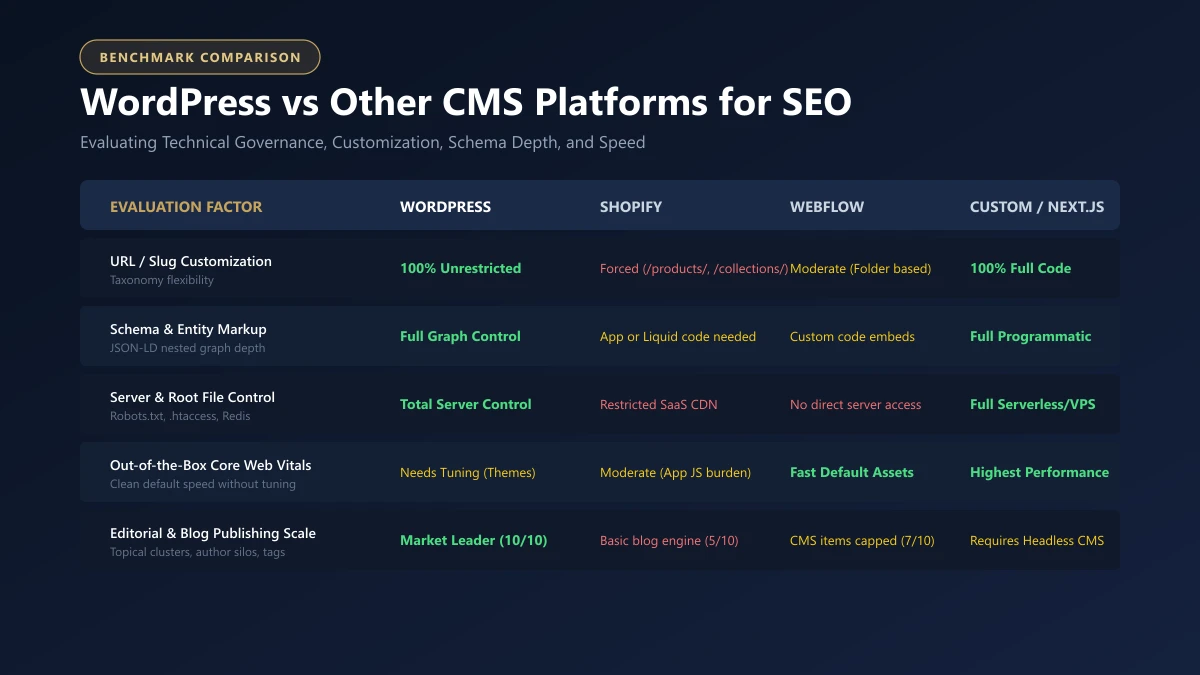
| SEO Feature / Capability | WordPress (Self-Hosted) | Shopify | Webflow | Custom Headless (Next.js) |
|---|---|---|---|---|
| URL Architecture Flexibility | 100% Unrestricted | Forced /products/ & /collections/ | Folder-based limitations | 100% Programmatic |
| Advanced Schema (JSON-LD) | Native Graph & Deep Plugin Support | Requires Liquid code or apps | Custom HTML embeds required | Full Programmatic Control |
| Server & Root File Access | Full Access (.htaccess, Nginx, Redis) | Zero direct server access | Proprietary closed SaaS host | Full Edge/Cloudflare/Vercel |
| Content Clustering at Scale | Industry Benchmark (Millions of URLs) | Basic blogging capabilities | Capped collection item limits | Requires separate Headless CMS |
| Core Web Vitals Out-of-the-Box | Requires active tuning & caching | Subject to heavy Shopify app scripts | Fast out of the box | Industry-leading sub-second speed |
WordPress vs Shopify for SEO
Shopify is a powerhouse for pure transactional commerce, but for SEO architecture, WordPress paired with WooCommerce or used as a hybrid editorial hub is substantially more flexible. Shopify forces all product pages under /products/ and catalog pages under /collections/. It also generates internal duplicate URLs when products are linked through collection pathways (e.g., /collections/shoes/products/sneaker vs /products/sneaker), relying purely on canonical tags to reconcile duplicates. With WordPress, you define your taxonomy structure with zero artificial constraints. For specialized store setups, explore our dedicated Ecommerce SEO services.
WordPress vs Webflow for SEO
Webflow provides an exceptional visual design interface and generates clean HTML/CSS out of the box. For small brochures or venture-backed tech startups needing 20 sleek marketing pages, Webflow is outstanding. However, for content-led enterprise SEO requiring thousands of dynamic articles, complex multi-author silos, custom relational taxonomies, or deep localized directories, Webflow hits rigid CMS collection item caps and costs escalate drastically. WordPress handles hundreds of thousands of indexed URLs with virtually zero scaling friction.
WordPress vs Headless React / Next.js for SEO
In recent years, enterprise development teams have adopted headless frontends (built on Next.js, Remix, or Nuxt) using WordPress as the decoupled backend via the WordPress REST API or WPGraphQL. This architecture combines the editorial workflow of WordPress with the instant page loads, Edge server-side rendering (SSR), and pristine Core Web Vitals of modern JavaScript frameworks.
However, headless WordPress requires substantial engineering overhead, ongoing developer maintenance, and specialized routing configurations to ensure canonical tags and sitemaps remain in sync. For 95% of businesses, a properly tuned, monolithic WordPress deployment with edge caching matches headless performance at a fraction of the cost.
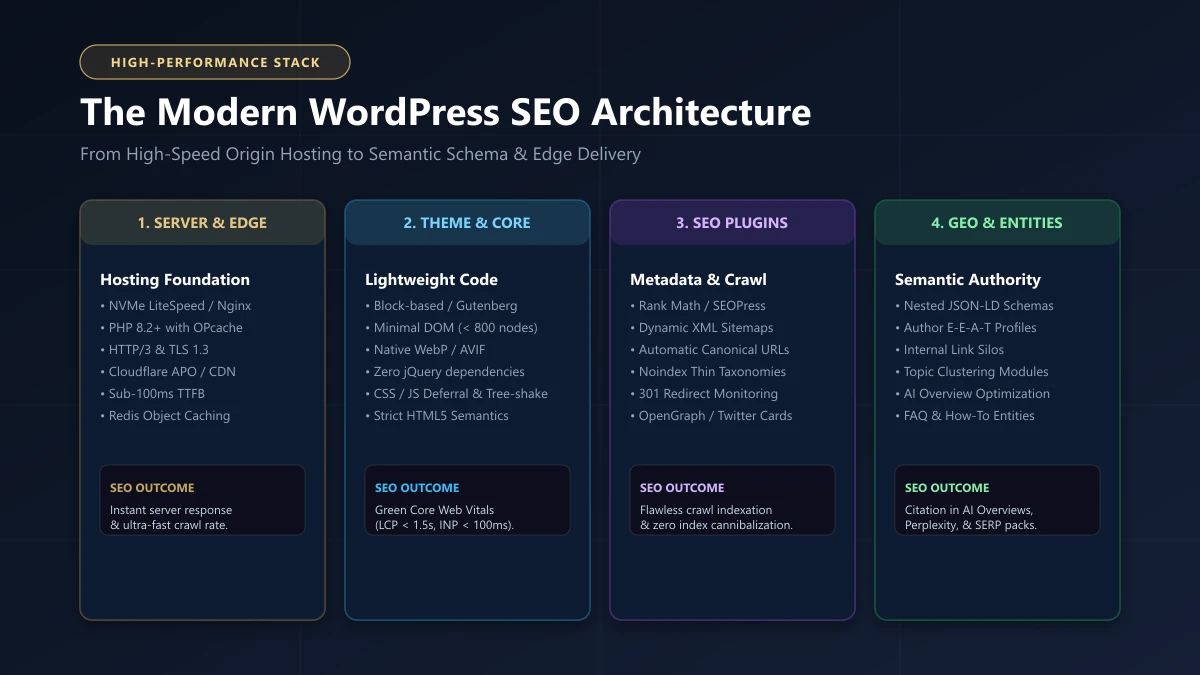
The Ultimate 2026 WordPress SEO Stack: How to Build a Ranking Machine
Transforming WordPress into an enterprise-grade SEO engine requires a disciplined, multi-tier architectural approach. Follow this battle-tested blueprint developed by our senior SEO engineering team:
Tier 1: High-Performance Infrastructure
- Modern Web Servers: Deploy on LiteSpeed Enterprise or optimized Nginx web servers running PHP 8.2 or 8.3 with OPcache enabled.
- Object Caching: Implement Redis or Memcached to eliminate redundant SQL queries to the
wp_optionsandwp_poststables. - Edge Page Caching & CDN: Utilize Cloudflare Automatic Platform Optimization (APO) or Cloudflare Enterprise to serve full static HTML pages directly from the edge cache, slashing TTFB to under 60ms globally.
Tier 2: Ultra-Lightweight Gutenberg Themes
Abandon bloated multi-purpose themes that ship with 80MB of bundled demo layouts. Modern SEO performance demands lean, block-first themes that output minimal DOM depth:
- GeneratePress Premium: Renowned for modular CSS (under 10KB), zero dependencies, and flawless Core Web Vitals.
- Astra Pro: Exceptionally lightweight codebase optimized for block-based visual workflows.
- Kadence WP: Built natively for the Gutenberg block editor with advanced accessible schema controls.
Tier 3: Precision SEO Plugin Configuration (Rank Math / SEOPress)
When configuring your primary SEO plugin, enforce strict governance rules:
- Set Thin Taxonomies to Noindex: Apply
noindex, followdirectives to Tag Archives, Date Archives, and Author Archives (if you are a single-author publication). - Redirect Media Attachment URLs: Ensure all attachment pages automatically 301 redirect back to the parent post to avoid blank attachment crawl loops.
- Strip Category Base: Remove unnecessary
/category/slug prefixes to shorten URL paths. - Automate Broken Link / 404 Monitoring: Catch crawl errors before search engines penalize user experience.
Tier 4: Next-Gen Media & Asset Optimization
Media assets account for over 60% of total payload weights on modern websites. In WordPress, configure automated asset pipelines:
- Convert Images to WebP / AVIF: Use tools like ShortPixel, Imagify, or LiteSpeed Cache to automatically serve modern, compressed WebP and AVIF formats.
- Enforce Explicit Image Dimensions: Ensure every
<img>element specifies explicitwidthandheightattributes or aspect ratios to permanently eradicate Cumulative Layout Shift (CLS). - Fetchpriority on Above-the-Fold Images: Set
fetchpriority="high"and preload directives on your featured hero image, while settingloading="lazy"on all below-the-fold media.
Tier 5: Generative Engine Optimization (GEO) & Schema Graphs
In 2026, search engine optimization is no longer restricted to traditional blue links. Search engines utilize conversational models like Google AI Overviews and Perplexity to summarize content directly on the SERP.
WordPress provides the ultimate framework for GEO, LLM & AI SEO services. By deploying deeply nested JSON-LD structured data graphs—linking Article, Person (Author E-E-A-T credentials), Organization, and FAQPage schemas—you give large language models the structured entity context necessary to cite your brand as an authoritative source in AI Overviews.
Practical WordPress SEO Audit Checklist for 2026
Before launching or migrating a WordPress site, audit these 10 technical checkpoints to verify that your installation is engineered for maximum search engine performance:
- Search Engine Visibility Toggle: Verify that Settings > Reading > Search Engine Visibility ("Discourage search engines from indexing this site") is strictly unchecked.
- Permalink Structure: Ensure permalinks are configured to Post name (
/%postname%/) or custom categorical hierarchy. - SSL & HTTPS Canonicalization: Confirm full HTTPS enforcement with HSTS, ensuring HTTP and non-WWW variants cleanly 301-redirect to your primary canonical domain.
- Active XML Sitemap Submission: Submit your primary index sitemap (e.g.,
/sitemap_index.xml) to Google Search Console and Bing Webmaster Tools. - Robots.txt Configuration: Ensure your
robots.txtfile does not inadvertently disallow access to/wp-content/uploads/, theme CSS, or JavaScript assets. - Theme Asset Hygiene: Inspect the DOM depth and ensure no legacy jQuery or unused Google Fonts are loading synchronously in the document
<head>. - Database Optimization: Run automated maintenance to clear transients, orphaned post meta, and limit post revisions to 3–5 versions via
wp-config.php. - Core Web Vitals Pass Rate: Validate via Google PageSpeed Insights that your mobile LCP is below 2.5s, INP is below 200ms, and CLS is under 0.10.
- Schema Validation: Run your URLs through Google's Rich Results Test tool to confirm zero errors or warnings on JSON-LD structured data.
- Internal Linking Silos: Verify that related posts and contextual links point logically to your core commercial landing pages and category hubs.
Strategic Verdict: Is WordPress the Right Choice for Your SEO?
To answer the foundational question: WordPress is not just good for SEO; when properly architected, it is arguably the most capable, adaptable, and cost-effective organic search platform ever created.
Its open-source architecture empowers engineering and content teams to pivot instantaneously in response to Google algorithmic updates. When search engines prioritize entity graphs, WordPress supports deep JSON-LD integration. When performance criteria tighten around Core Web Vitals, WordPress allows edge caching, serverless CDNs, and headless decoupling.
However, WordPress is not a magic wand. An unmaintained WordPress site laden with obsolete plugins, budget shared hosting, and heavy visual builders will quickly succumb to crawl bloat and performance degradation.
Winning in modern search requires treating WordPress as an enterprise technology stack. If you are preparing to build, optimize, or migrate a high-stakes web property, partner with a dedicated agency like Professional SEO Services to eliminate technical bottlenecks, maximize Core Web Vitals, and unlock compounding organic revenue.
Frequently Asked Questions: WordPress & SEO
Is WordPress inherently good for SEO out of the box?
Yes, WordPress provides an exceptionally strong structural foundation for SEO out of the box. Its core architecture generates clean semantic HTML5 markup, supports customizable permalink hierarchies, automatically generates XML sitemaps, and features native taxonomy systems. However, WordPress itself will not magically rank your website; achieving page-one visibility requires proper server configuration, speed optimization, quality content, and dedicated on-page and technical SEO execution.
Can a WordPress site rank on Google without third-party SEO plugins?
Yes. Google indexes and evaluates content based on rendered HTML, schema markup, performance, and topical relevance—not the presence of an SEO plugin. WordPress natively outputs canonical tags and sitemaps. However, leading plugins like Rank Math, SEOPress, or Yoast provide critical granular controls over title tags, OpenGraph data, noindex directives for thin archives, and complex JSON-LD structured data without touching server code.
Does WordPress have Core Web Vitals and speed problems?
WordPress core itself is lightweight and highly efficient. Speed and Core Web Vitals issues on WordPress sites almost universally stem from third-party bloat: budget shared hosting with poor Time to First Byte (TTFB), oversized multi-purpose themes, visual drag-and-drop builders (like unoptimized Divi or Elementor setups), and stacking dozens of unvetted plugins that inject redundant JavaScript and CSS.
Which SEO plugin is best for WordPress in 2026: Yoast or Rank Math?
In 2026, Rank Math and SEOPress generally outperform Yoast SEO for modern search demands. Rank Math offers advanced modular JSON-LD schema builders, integrated index status monitoring, and lightweight resource footprints in its free and pro tiers. While Yoast remains stable and battle-tested, it gates multiple advanced schema types and redirection features behind higher subscription tiers.
Is WordPress better for SEO than Shopify, Webflow, or custom React/Next.js?
WordPress offers superior SEO flexibility compared to Shopify and Webflow because it provides unrestricted access to server configuration, URL structures, rewrite rules, and database queries. Shopify imposes strict URL folder prefixes (/products/, /collections/) and limited robots.txt control, while Webflow limits programmatic schema and large-scale editorial workflows. However, custom Next.js or headless WordPress solutions can achieve faster sub-second Core Web Vitals if engineered with advanced front-end pipelines.
What are the most common technical SEO mistakes made on WordPress sites?
The most frequent WordPress technical SEO errors include leaving tag and date archives indexable (causing thin content and index bloat), failing to implement Redis/Memcached object caching, installing conflicting plugins that create duplicate OpenGraph and canonical tags, running uncompressed images without explicit width/height dimensions (causing CLS), and failing to configure 301 redirects during slug updates.

Written by Rehan Saeed
Lead SEO Specialist & Technical Search Architect at Professional SEO Services
Rehan specializes in large-scale technical SEO, CMS performance engineering, entity schema graph deployment, and enterprise organic search strategies. Connect on LinkedIn for deep search marketing insights.