Keyword research is the single most critical foundation of organic search marketing. Without understanding how to do keyword research effectively, every blog post, landing page, and product page you publish is essentially an unguided gamble.
At its core, keyword research helps identify what people search for, why they search for it, and how your website can engineer content that directly satisfies those needs. It bridges the gap between consumer intent and your business offerings. When executed correctly, keyword research does far more than assemble a spreadsheet of popular search terms—it reveals market demand, guides your site architecture, uncovers competitor weaknesses, and drives predictable qualified revenue to your bottom line.
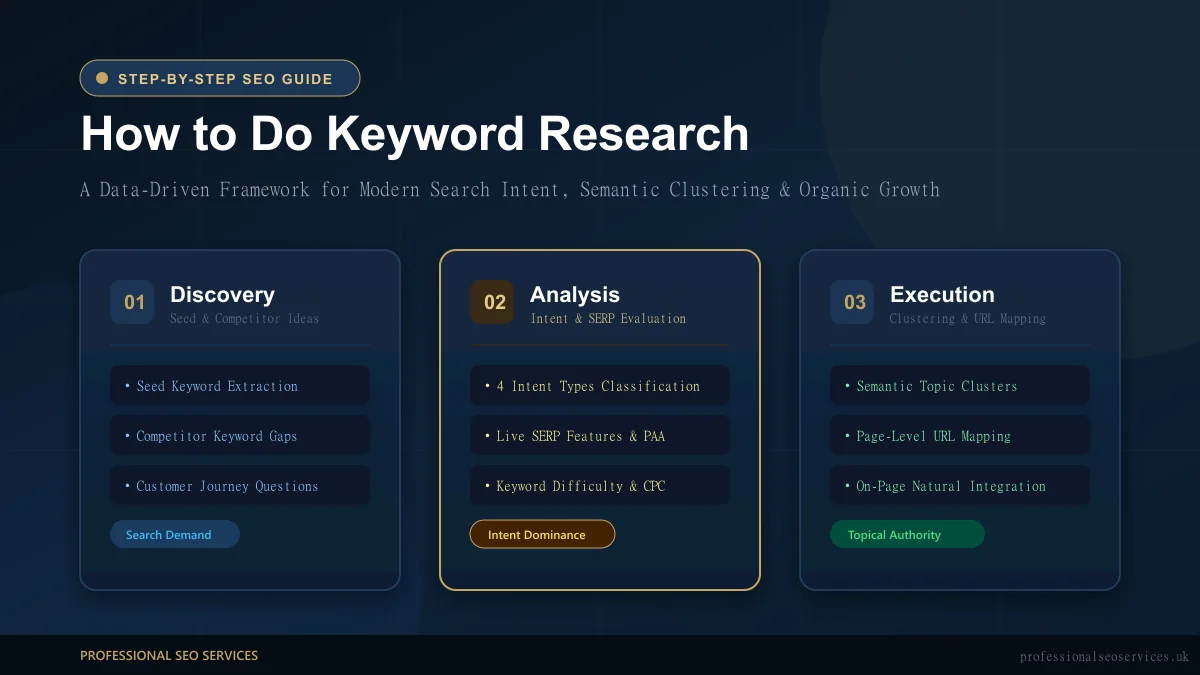
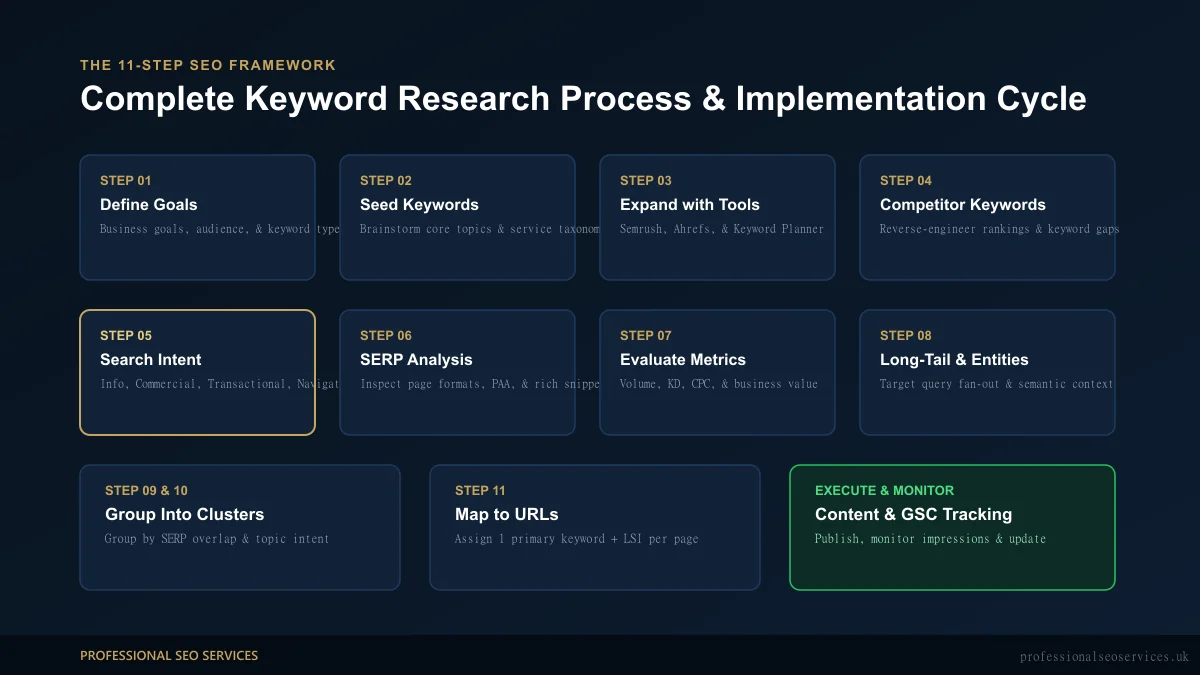
Whether you are an in-house marketer, an ecommerce entrepreneur, or an enterprise SEO architect, mastering search demand requires a methodical, end-to-end framework. In this definitive guide, we will walk you through the complete, modern 11-step keyword research process:
- Define your business and SEO goals to align search queries with bottom-line revenue.
- Understand your audience to capture genuine customer pain points and decision journeys.
- Find seed keywords that establish your core topic taxonomies.
- Expand keyword ideas using modern data-backed industry tools.
- Discover competitor keywords and exploit profitable keyword gap opportunities.
- Analyze search intent and SERPs to align page formats with what Google actually rewards.
- Evaluate keyword metrics including search volume, keyword difficulty, CPC, and traffic potential.
- Find long-tail and related keywords that drive fast, high-converting organic traffic.
- Discover semantic keywords and entities to satisfy modern NLP algorithms and AI search engines.
- Group keywords into clusters to build cohesive topical authority without content fragmentation.
- Map keywords to website pages and prioritize execution to eliminate cannibalization risks.
Beyond the 11-step workflow, this guide provides hands-on implementation rules across major CMS platforms (WordPress, Shopify, Squarespace, Blogger), examines platform-specific tactics for Instagram and YouTube, explains how to inspect your existing Google Search Console performance data, answers critical questions around keyword quantity and density, and provides a real-world downloadable spreadsheet framework. If your team is seeking to scale revenue through enterprise-grade search strategies, explore how our dedicated professional seo services engineer organic market dominance for ambitious brands.
What Is Keyword Research?
Before diving into advanced workflows, it is essential to establish what keyword research entails in modern search engine optimization and dispel common misconceptions inherited from legacy SEO practices.
What does keyword research mean in SEO?
In technical SEO terms, keyword research is the systematic process of discovering, analyzing, and selecting the search queries that people submit into search engines like Google, Bing, and AI conversational search engines.
However, modern keyword research is not merely about finding isolated words with high search counts. It examines the intricate relationship between four distinct elements:
- Search queries: The raw, verbatim strings of words typed or spoken by real human searchers (e.g., “best way to research keywords for blog 2026”).
- Keywords: The standardized search terms and topics marketers extract, evaluate, and target in their digital strategies (e.g., “how to do keyword research”).
- Topics: The broader subject matter, umbrella concepts, and semantic entities that connect individual keywords together into structured knowledge graphs.
- Search intent: The underlying motivation, objective, or psychological goal behind why a searcher entered that specific query into the search bar.
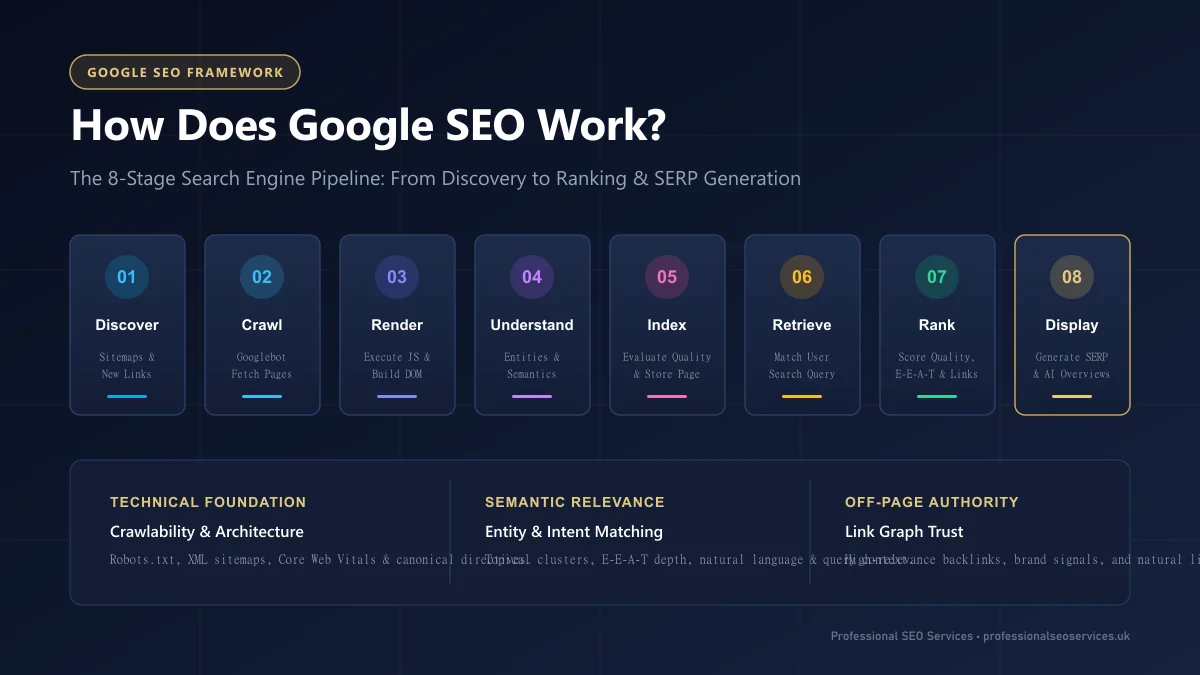
By evaluating these relationships, keyword research transforms unstructured query logs into actionable content architectures that serve both human readers and search engine crawlers. For a broader overview of how search algorithms process these components, read our foundational guide to What Is SEO.
Why is keyword research important for SEO?
Investing time and capital into digital content without conducting keyword research is like building a retail storefront in the middle of a desert. Keyword research delivers fundamental strategic benefits across every tier of your marketing operations:
- Understanding audience demand: You eliminate guesswork by basing your content strategy on empirical search data that proves exactly what questions, struggles, and solutions your prospective customers care about.
- Finding content opportunities: It unearths underserved market niches, emerging industry trends, and high-intent customer inquiries that competitors have neglected.
- Building website architecture: Keyword clustering informs your site hierarchy, category taxonomy, and navigation menus, ensuring your site structure intuitively reflects user mental models.
- Improving organic visibility: By incorporating the precise phrases, synonyms, and semantic entities algorithms use to score relevance, your pages become eligible to rank for hundreds of related search variations.
- Planning content: It provides a prioritized, data-driven editorial calendar, allowing marketing teams to forecast traffic, assign resources efficiently, and eliminate wasted effort.
- Supporting topical authority: Search engines reward websites that demonstrate deep, exhaustive mastery of an entire subject. Comprehensive keyword research maps out the entire topic web required to earn algorithmic trust.
- Identifying commercial opportunities: Keyword metrics (such as CPC and transactional intent modifiers) pinpoint high-converting buyer queries that deliver immediate leads, client retainers, and product sales.
Is keyword research still important for SEO?
With the rise of Google’s BERT, MUM, RankBrain, and AI Overviews, some marketers erroneously claim that “keyword research is dead.” This is a dangerous misunderstanding of how modern retrieval algorithms function.
What has truly died is simplistic exact-match keyword repetition. In the early days of search, ranking for a phrase meant stuffing that exact string into your title tag, headers, and body text at an artificial 3% density. Today, Google and large language models (LLMs) evaluate content through vector embeddings and natural language processing. They understand conceptual relationships, synonyms, and intent context.
Consequently, keyword research is more vital than ever—but its focus has shifted from mechanical string matching to intent validation, topic modeling, semantic entity mapping, and user need satisfaction. Rather than finding a single keyword to repeat, you conduct keyword research to identify the entire semantic neighborhood required to produce the definitive resource on that subject.
How to Do Keyword Research: The Complete Step-by-Step Process
To achieve predictable organic growth, you need an actionable, repeatable workflow. The following 11-step blueprint breaks down the exact methodology utilized by senior organic search consultants to uncover, validate, and execute winning keyword strategies.
Step 1 — Define Your SEO and Business Goals
The single biggest mistake in keyword research is jumping directly into a software tool and typing in random words. Effective keyword research must always begin with clear business and commercial objectives.
If your research is disconnected from your revenue engine, you will inevitably rank for vanity keywords that attract massive traffic but zero paying customers. Before touching an SEO tool, clearly define:
- Products and core services: What are your primary profit centers? Which services generate your highest lifetime customer value (LTV)?
- Target audience demographics: Who has the budget and authority to purchase your solution? (e.g., enterprise CTOs vs. small business owners).
- Geographic market constraints: Are you targeting local clients in the UK, a national market, or an international multi-language audience?
- Website business model: Is your site monetized through ecommerce checkout, B2B lead generation forms, software subscriptions, or affiliate advertising?
- Conversion goals: What constitutes a successful visit? A newsletter signup, a scheduled strategy call, a demo request, or an immediate checkout?
- Content priorities: Do you need bottom-of-funnel service pages to close immediate pipeline, or top-of-funnel educational articles to build brand awareness?
Identify your target audience
Great keyword research is customer research in disguise. To uncover the terms your prospects use when they are ready to act, analyze their behavioral journey:
- Customer problems: What acute friction points or operational roadblocks keep them awake at night? (e.g., “organic traffic dropped after core update”).
- Questions: What specific inquiries do they raise during initial sales calls or customer support tickets?
- Buying motivations: What metrics or outcomes justify their purchase? (e.g., ROI, security compliance, speed of execution).
- Awareness stages: Searchers progress from Problem-Aware (“why is my website slow”) to Solution-Aware (“how to optimize core web vitals”) to Product-Aware (“technical seo agency uk”).
- Search behavior: Enterprise buyers search using formal, technical industry terminology, whereas consumer buyers use conversational, colloquial phrasing.
Choose the right keyword type
A balanced SEO strategy requires targeting different keyword classifications across the customer conversion funnel:
- Informational keywords: Queries where users seek explanations, guides, or definitions (e.g., “what is technical seo”). Ideal for blog posts and knowledge hubs.
- Commercial investigation keywords: Queries where users evaluate solutions, compare software, or research providers (e.g., “semrush vs ahrefs” or “best seo agency in uk”).
- Transactional keywords: High-intent queries where the user is prepared to transact immediately (e.g., “hire on-page seo expert” or “buy shopify seo audit”).
- Navigational keywords: Queries seeking a specific company portal or brand domain (e.g., “professional seo services contact”).
- Branded keywords: Queries incorporating your proprietary brand name, product names, or executive leaders (e.g., “rehan saeed seo”).
- Non-branded keywords: General industry queries through which uninitiated prospects discover your website (e.g., “ecommerce seo services”).
- Local keywords: Search terms with geographic qualifiers or localized implicit intent (e.g., “seo services london” or “plumber near me”).
Step 2 — Create Your Seed Keyword List
Once your business goals and customer profiles are defined, you are ready to construct your seed keyword foundation.
What are seed keywords?
Seed keywords are broad, foundational starting phrases that describe your core products, services, and central industry topics. They do not need to be long-tail or hyper-specific; rather, they serve as the root inputs you will plug into SEO discovery tools to generate thousands of actionable keyword variations.
Where to find seed keywords
You do not need paid software to brainstorm a high-quality seed list. Tap into these rich business sources:
- Products and service catalogs: Your existing service offerings and product SKU hierarchies represent your most obvious seed candidates.
- Existing website navigation: Inspect your main menu, header dropdowns, and category labels.
- Customer questions: Review recent emails, live chat transcripts, and recorded discovery calls.
- Sales and support teams: Interview your frontline sales reps. Ask them: “What words do prospects use when describing their biggest frustration?”
- Competitor websites: Review the primary navigation links and title tags of your top 3 market competitors.
- Google Autocomplete: Type a root phrase into Google and note the automatic search predictions.
- Google Trends: Check rising interest queries related to your industry vertical.
- Google Search Console: Inspect queries that are already generating early impressions for your root domain.
- Reddit and relevant forums: Browse subreddits (e.g., r/SEO, r/ecommerce, r/smallbusiness) to observe organic industry conversations.
Example of creating seed keywords
Consider a specialized digital marketing agency offering organic search solutions. A robust seed keyword list would include:
SEO services(Broad commercial root)Local SEO(Geographic optimization pillar)Technical SEO(Infrastructure and performance pillar)Ecommerce SEO(Industry-specific vertical)SEO audit(High-intent diagnostic product)Keyword research(Foundational strategy service)On-page SEO(Content and page-level optimization)
Each of these seeds will serve as an engine to discover hundreds of specific long-tail queries, intent modifiers, and cluster opportunities.
Step 3 — Expand Your Keyword Ideas Using Industry Tools
With your seed list assembled, you can now leverage industry-standard keyword research software to expand your initial terms into an exhaustive, data-rich keyword universe.
Semrush Keyword Magic Tool
Semrush houses one of the largest commercial keyword databases in the industry. The Keyword Magic Tool allows you to enter a single seed phrase and immediately generates millions of query permutations grouped into intuitive topic clusters.
- Keyword variations: Discover Broad Match, Phrase Match, and Exact Match variations of your seed terms.
- Search volume: Review monthly average search frequency estimates across national and international markets.
- Keyword difficulty (KD%): Evaluate algorithmic competition scores based on the backlink profiles of currently ranking URLs.
- Search intent tags: Semrush automatically tags keywords with Informational (I), Navigational (N), Commercial (C), and Transactional (T) indicators.
- Question filtering: Click the “Questions” tab to extract interrogative queries (Who, What, Where, When, Why, How) perfect for blog articles and FAQ sections.
- Related terms: Identify queries that share semantic SERP overlap even if they do not contain the exact seed phrase.
Ahrefs Keywords Explorer
Ahrefs is renowned for its granular clickstream data and deep SERP analysis features. In Keywords Explorer, you can uncover critical metrics not found in standard tools:
- Keyword ideas: Access 6 distinct idea reports: Terms match, Questions, Also rank for, Also talk about, Search suggestions, and Newly discovered.
- Search volume & Clicks: Ahrefs distinguishes between total searches and actual clicks, identifying queries where Google AI Overviews or featured snippets satisfy the query without a click.
- Keyword Difficulty (KD): Ahrefs estimates how many referring domains (backlinks) a new page needs to reach page one.
- Traffic Potential: Displays the total organic traffic the #1 ranking page earns from all the keywords it ranks for simultaneously—a far more accurate metric than individual search volume.
- Parent Topic: Identifies the overarching primary query you can rank for while targeting your chosen long-tail term.
- SERP overview: Provides an instant snapshot of the top 10 ranking URLs, their Domain Rating (DR), URL Rating (UR), backlink counts, and estimated monthly visits.
Google Keyword Planner
Google Keyword Planner (GKP) is Google’s native ad planning platform. While built for Google Ads, it provides indispensable firsthand search demand insights:
- Direct Google search demand: Data comes directly from Google’s proprietary search log infrastructure.
- Keyword ideas by URL: You can enter a competitor’s landing page URL to extract the keywords Google associates with that specific content.
- Competition & Top of Page Bid (CPC): High Cost-Per-Click (CPC) figures indicate that commercial advertisers bid aggressively for that term, validating its high conversion value.
- Organic SEO limitations: GKP clusters distinct variations into broad monthly search volume buckets (e.g., 1K–10K) unless you maintain an active ad spend, and its “Competition” metric reflects paid advertiser bid density rather than organic ranking difficulty.
Other keyword research tools
Depending on your budget and specific niche requirements, several specialized keyword tools offer unique advantages:
- Moz Keyword Explorer: Excellent for its proprietary Organic CTR prediction and Priority Score, which mathematically balances Volume, Difficulty, and Opportunity into a single actionable metric.
- Ubersuggest: A cost-effective, beginner-friendly tool for small business owners seeking quick keyword ideas, content suggestions, and fundamental competitor audits.
- KWFinder (Mangools): Renowned for having one of the most user-friendly interfaces and highly accurate real-time keyword difficulty calculations for low-competition long-tail queries.
Step 4 — Find Keywords Your Competitors Rank For
Why build a keyword strategy from scratch when your competitors have spent years and thousands of pounds testing the market? Competitor keyword research allows you to reverse-engineer their most lucrative organic traffic channels.
How to find SEO keywords for a competitor website
Follow this structured reverse-engineering protocol:
- Identify direct organic competitors: Distinguish between direct business competitors (firms offering identical services in your region) and SERP competitors (publications, blogs, or software directories competing for the same search terms).
- Enter competitor domains into an SEO tool: Input competitor URLs into Semrush’s Domain Overview or Ahrefs’ Site Explorer.
- Export ranking keywords: Filter for keywords ranking in positions 1 through 20 with minimum monthly search volumes.
- Filter out branded terms: Exclude queries containing their proprietary company name or team members.
- Identify keywords with high business relevance: Isolate high-intent terms that map directly to your service capabilities.
- Compare competitor rankings with your own: Assess whether the competitor’s ranking page is a blog article, a service landing page, or a calculator tool.
How to find SEO keywords of a website
You can analyze search queries across multiple scopes:
- Entire domain analysis: Uncover the macroscopic keyword footprint of an entire company to understand their primary organic revenue drivers.
- Subfolder analysis: Inspect specific sections of a site (e.g.,
domain.com/blog/vs.domain.com/services/) to separate informational content strategy from commercial landing pages. - Individual URL inspection: Paste a specific high-ranking competitor URL into your tool to reveal the hundreds of secondary long-tail queries that individual page ranks for simultaneously.
What is keyword gap analysis?
A keyword gap analysis (also known as content gap analysis) compares your website’s ranking keyword portfolio against 2 to 4 of your primary organic competitors.
The tool highlights four critical data segments:
- Missing keywords: Queries for which all your competitors rank in the top 10, but your website has zero rankings. These represent immediate content blind spots.
- Weak keywords: Queries where both you and your competitors rank, but competitors consistently outrank you on page one while you linger on page two or three.
- Shared keywords: Competitive terms where you and your rivals battle for top visibility.
- Untapped opportunities: Keywords where only one competitor ranks, signaling an underserved opportunity where you can easily publish a superior resource.
How to find SEO keywords for a website for free
If you are working without paid subscription tools, you can extract comprehensive keyword intelligence completely free using native Google features:
- Google Search Console (GSC): Log into GSC, click Performance, and review the Queries tab to uncover thousands of hidden terms your site already generates impressions for.
- Google Autocomplete: Type your seed phrase followed by alphabetical wildcards (e.g., “seo services a...”, “seo services b...”) to uncover popular search strings.
- People Also Ask (PAA) boxes: Click and expand PAA accordion questions to trigger Google’s dynamic query expansion, revealing dozens of related questions searchers demand answers to.
- Related Searches: Scroll to the bottom of Google’s SERP to inspect the 8 algorithmically curated related searches.
- Manual competitor inspection: Right-click on a competitor's page, select “View Page Source”, and inspect their
<title>,<h1>, and<h2>headings to see their targeted phrases.
Step 5 — Analyze Search Intent
Search intent (also known as user intent) is the single most critical ranking factor in modern search engine optimization. If your content does not satisfy the precise intent of the searcher, Google will not rank your page—regardless of your backlink profile, domain age, or technical speed.
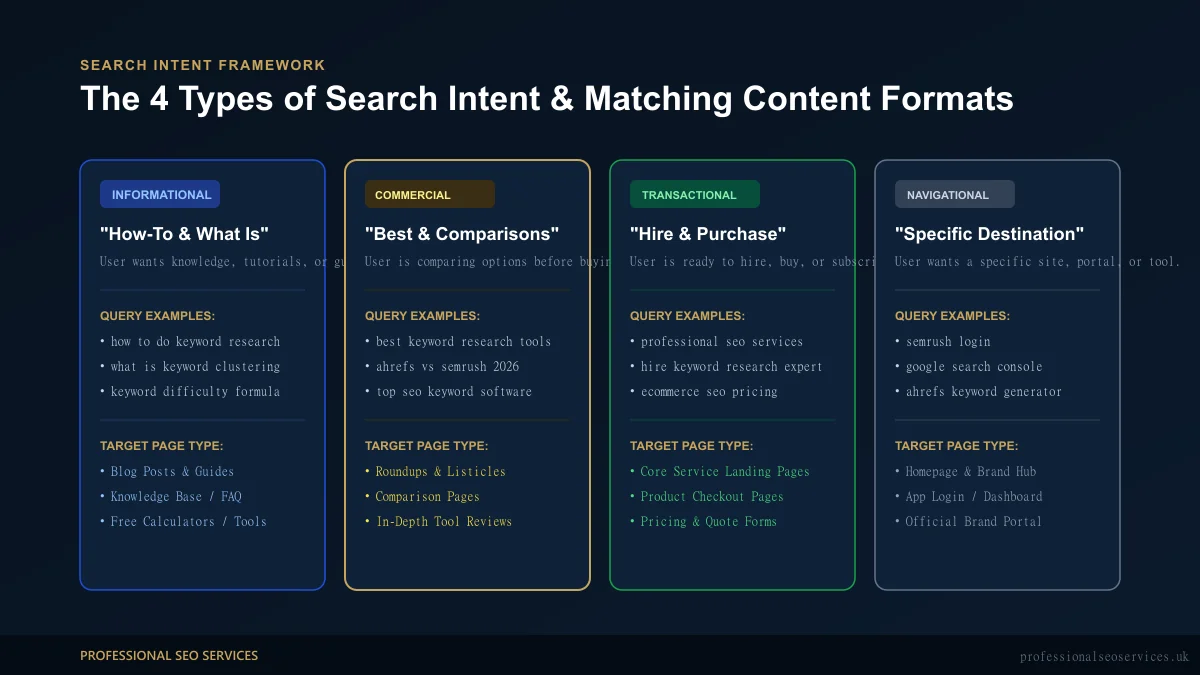
The four main types of search intent
Every search query submitted into Google falls into one of four distinct intent categories:
- Informational Intent: The user wants to learn, research, troubleshoot, or understand a concept. Examples: “how to do keyword research”, “what is topical authority”, “on-page seo checklist”.
- Commercial Investigation Intent: The user has identified their need and is actively comparing brands, reviewing tools, or evaluating alternatives before purchasing. Examples: “best keyword research tools”, “ahrefs vs semrush”, “top seo agencies uk”.
- Transactional Intent: The user is ready to make a financial commitment, request a quote, or sign up for a service immediately. Examples: “hire keyword research expert”, “professional seo services pricing”, “buy technical seo audit”.
- Navigational Intent: The searcher already knows the brand or destination they wish to visit and uses Google as a shortcut. Examples: “Semrush Keyword Magic Tool login”, “Google Search Console”.
How to determine search intent
Never guess intent based on keyword wording alone. The only definitive authority on search intent is the live Google Search Engine Results Page (SERP). Google’s machine learning algorithms constantly evaluate billions of user clicks, dwell times, and bounce rates to determine exactly what content format searchers prefer.
To determine intent accurately, analyze:
- Dominant ranking page types: Are the top 5 results blog posts, product category pages, homepages, or interactive calculators?
- SERP features present: Does Google display Featured Snippets (informational), Product Listing Ads (transactional), Video Carousels (procedural how-to), or Local Packs (geographic)?
- Headline phrasing: Do ranking titles feature phrases like “How to...”, “Top 10 Best...”, or “Official Services”?
- Content format and depth: Are the ranking pages comprehensive 3,000-word step-by-step masterclasses, or concise 500-word product summaries?
Why search volume alone is not enough
Novice SEOs obsess over search volume, chasing broad, generic terms with 50,000 searches per month. This is almost always a catastrophic waste of resources.
Consider this comparison:
A high-intent keyword with 250 monthly searches that generates 15 qualified sales inquiries is infinitely more valuable than a generic term with 100,000 searches that brings students writing school essays. Always prioritize business relevance and commercial intent over raw search volume.
Step 6 — Analyze the Search Engine Results Page
SERP analysis is your quality-assurance step. It validates whether your proposed content angle can legitimately compete in the current algorithmic landscape.
What to look for in the SERPs
Perform an incognito search for your target query and dissect the anatomy of the search results page:
- Ranking domain authority: Are the top 10 positions dominated by government websites, Wikipedia, and billion-pound publishers (e.g., Forbes, G2), or are independent specialist blogs ranking?
- Content formats: Are the pages comprehensive guides, listicles, product pages, case studies, or video walk-throughs?
- SERP features taking visual real estate: Is organic position #1 pushed below the fold by AI Overviews, 4 Google Ads, a Local Map Pack, and a People Also Ask box?
- Community forums: Are Reddit and Quora threads ranking in the top 5? This is a massive signal that the query lacks high-quality expert content, making it prime for you to outrank.
- Local search filters: Does Google serve a map pack even without geographic modifiers? If so, this query requires a localized landing page.
Does your page belong in this SERP?
Before creating content, confirm that your planned page type matches algorithmic expectations:
- Blog post / Article: Belongs when the SERP is 100% educational, informational, and dominated by step-by-step guides.
- Core service landing page: Belongs when ranking URLs feature pricing tables, client testimonials, and consultation booking forms.
- Ecommerce category page: Belongs when results display product grids with facet filters (e.g., “buy organic coffee beans”).
- Product detail page (PDP): Belongs when the user searches for a specific brand model or SKU (e.g., “sony wh-1000xm5 black”).
- Supporting cluster article: Belongs when answering a hyper-specific sub-question that links back to a broader pillar resource.
Step 7 — Evaluate Keyword Metrics
To build a predictable organic roadmap, you must learn to interpret the key quantitative metrics supplied by SEO software.
Search volume
Search volume represents the estimated average number of times a specific keyword is searched over a 12-month period, typically reported on a monthly basis.
Remember: search volume is always an estimate, not an exact census. Furthermore, search volume does not account for zero-click searches or users who search multiple times in a single session. Treat volume as a relative directional indicator rather than an absolute truth.
Keyword difficulty
Keyword Difficulty (KD) is an index (usually scored on a scale from 0 to 100) that estimates how challenging it will be to rank on page one of Google for that query.
Most tools calculate KD primarily by evaluating the quantity and quality of backlinks pointing to the current top 10 URLs. While helpful, KD does not evaluate content quality, search intent match, internal linking, or your domain’s specific topical authority. A site with immense topical authority can easily rank for “High KD” keywords within its core niche without having hundreds of backlinks.
Traffic potential
Pioneered by Ahrefs, Traffic Potential is a vastly superior metric to individual search volume. A well-optimized webpage rarely ranks for just one keyword; it ranks for hundreds or thousands of related long-tail queries.
A target keyword might have a search volume of only 800 searches per month, but the #1 ranking URL might generate 12,000 monthly visits because it simultaneously ranks for 350 related synonyms and long-tail variants. Always evaluate total page traffic potential before discarding a seemingly low-volume query.
Cost per click
Cost Per Click (CPC) reflects the average dollar amount advertisers pay for a single user click in Google Ads.
While CPC is an advertising metric, it provides invaluable commercial intelligence for organic SEO. When advertisers are willing to pay £15, £30, or £50 per click for a search phrase, it serves as undeniable market proof that the query generates lucrative revenue. Targeting high-CPC queries with organic SEO delivers astronomical long-term ROI.
Search trends and seasonality
Search demand fluctuates throughout the year. Queries like “tax return preparation” peak in January and April, while “black friday deals” surge in November.
Use tools like Google Trends to evaluate historical demand cycles. Understanding seasonality ensures you publish and index content 2 to 3 months prior to peak search demand, capturing traffic the moment user interest spikes.
Business relevance
Business relevance is the ultimate qualitative filter. Score every keyword on a 1-to-3 scale:
- Score 3 (High Value): The query directly describes your core product or service. Searchers are prospective buyers.
- Score 2 (Moderate Value): The query addresses a problem your service solves, but the user is still in the research phase.
- Score 1 (Low Value): The query is broadly related to your industry but unlikely to ever convert into revenue. Exclude these from your primary roadmap.
Step 8 — Find Long-Tail Keywords and Related Search Queries
While broad head terms capture executive attention, long-tail keywords constitute approximately 70% of all global search traffic and represent the fastest path to organic profitability.
What are long-tail keywords?
Long-tail keywords are highly specific search queries that typically (though not always) contain three or more words. They receive lower individual monthly search volume but collectively represent the vast majority of search queries.
For example:
- Head term: “SEO” (135,000 searches/mo – Vague intent)
- Middle-tail keyword: “Keyword research tools” (8,100 searches/mo – Commercial investigation)
- Long-tail keyword: “How to do keyword research for ecommerce shopify store” (170 searches/mo – Precise intent, high conversion)
Why are long-tail keywords useful?
Targeting long-tail queries provides distinct strategic advantages:
- Ultra-specific intent: You know exactly what the user is trying to accomplish, allowing you to craft a hyper-personalized response.
- Question-based format: Many long-tail searches take the form of direct questions, making them effortless to target with structured FAQ schema and featured snippets.
- Low ranking competition: Established enterprise domains often ignore queries with fewer than 200 searches per month, leaving page one wide open for agile websites.
- Superior conversion rates: Searchers using specific long-tail phrasing are significantly closer to taking action than broad exploratory searchers.
How to find long-tail keywords
To systematically uncover long-tail opportunities:
- Google Autocomplete expansion: Type your core service followed by question modifiers: who, what, where, when, why, how, can, does.
- Google People Also Ask (PAA): Harvest the related questions displayed in Google SERPs for every core service query.
- Google Related Searches: Extract the 8 related search terms at the bottom of search results.
- Semrush Keyword Magic Tool (Questions filter): Filter your seed list for minimum word counts (≥ 4 words) and interrogative formats.
- Ahrefs Search Suggestions: Extract real search suggestions generated from auto-complete feeds.
- Google Search Console: Filter your query reports for queries containing 4+ words that are already winning impressions in positions 11–30.
Step 9 — Discover Semantic Keywords and Entities
Search engines have evolved from syntactic keyword-matching engines into sophisticated semantic entity-retrieval networks. Understanding semantic SEO is mandatory for dominating modern organic search.
To optimize effectively, you must understand the distinction between:
- Primary keywords: The core target query assigned to a page (e.g., “how to do keyword research”).
- Secondary keywords: Direct synonyms, closely aligned variations, and subtopic queries (e.g., “seo keyword research process”, “how to find search keywords”).
- Related keywords: Queries that naturally co-occur in discussions about the topic (e.g., “search intent”, “keyword difficulty”, “serp analysis”).
- Semantic keywords / Entities: Named, unambiguous concepts, people, tools, organizations, and processes recognized in Google’s Knowledge Graph (e.g., Google Search Console, Semrush, BERT, Natural Language Processing, RankBrain).
- Topics: The overarching subject umbrellas that unify groups of entities into coherent domains of knowledge.
How to find semantically related keywords
Uncover semantic relationships through these methodologies:
- SERP content analysis: Examine the top 3 ranking URLs. What technical concepts, subtopics, and industry terminology appear consistently across all three pages?
- Query fan-out analysis: Deconstruct how an AI search engine breaks your core topic down into supporting sub-questions (e.g., Definitions, Tools, Step-by-Step Execution, Common Mistakes, Metrics, CMS Implementation).
- Google NLP API Demo: Paste top-ranking competitor content into Google’s public Cloud Natural Language API to see which entities Google extracts and how it scores their salience.
- Related searches & Google Trends: Review entity connections displayed in Google Knowledge Panels.
Why semantic relevance matters
When Google evaluates a comprehensive guide on keyword research, it does not just look for the phrase “how to do keyword research.” It expects to find entities like search intent, Google Keyword Planner, search volume, keyword clustering, and cannibalization.
Including these semantic concepts demonstrates topical completeness, allowing you to outrank competitors naturally without ever resorting to awkward keyword repetition. For an in-depth exploration of semantic content architecture, read our guide on Content Strategy for Topical Authority.
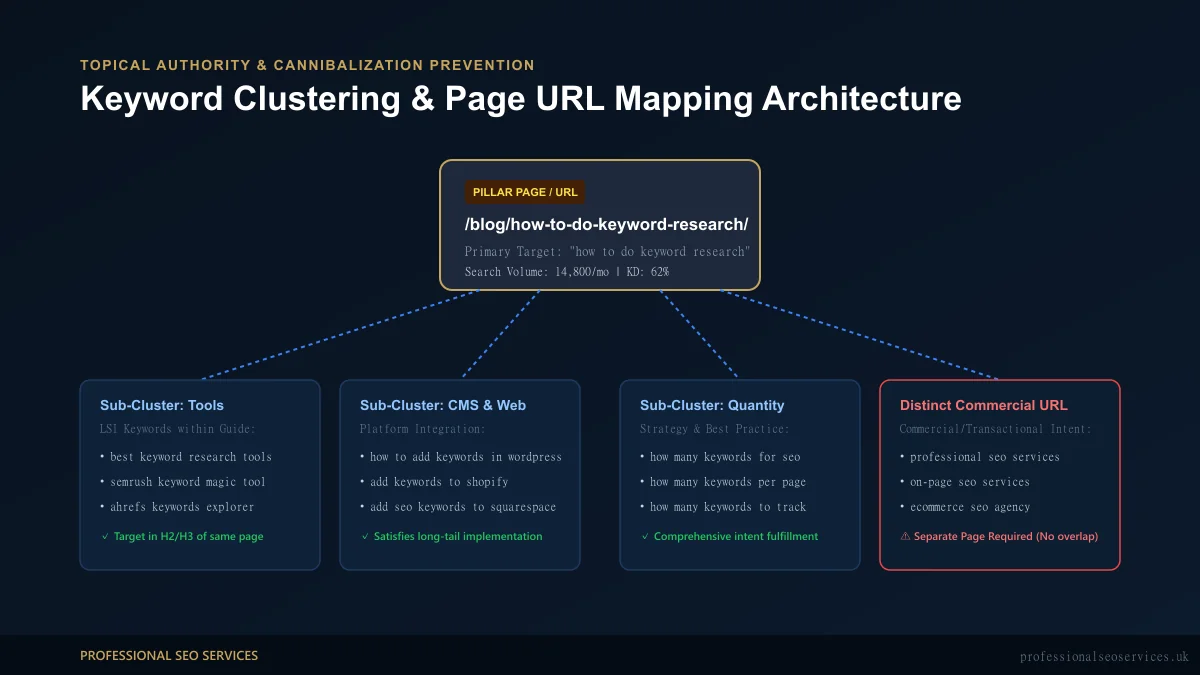
Step 10 — Group Keywords Into Clusters
Now that you possess a raw list of hundreds of keyword ideas, you must organize them into structured, actionable groups. This process is called keyword clustering.
What is keyword clustering?
Keyword clustering is the practice of grouping related search queries together based on shared search intent, topic relationships, and SERP overlap so that a single, authoritative webpage can target the entire group simultaneously.
When should multiple keywords target one page?
Combine multiple keywords onto a single page when:
- Search intent is identical: The searcher wants the same ultimate answer or outcome regardless of minor wording differences (e.g., “how to find search keywords” and “how to do keyword research”).
- SERPs substantially overlap: When you search both keywords in Google, 6 or more of the top 10 ranking URLs are identical. This is mathematical proof that Google considers both queries part of the same topic.
- One page can satisfy the queries comprehensively: Combining the concepts into one thorough guide provides a superior user experience compared to splitting them across thin, disjointed pages.
When should keywords have separate pages?
Create distinct, dedicated pages when:
- Search intent differs: One query is informational (“what is on-page seo”) while the other is commercial/transactional (“on-page seo services”). Combining these will fail to rank for either.
- SERPs have little or no overlap: The top 10 results for Query A share fewer than 2 or 3 URLs with Query B.
- Distinct product or service offerings: Inquiries represent separate services that require distinct value propositions, case studies, and conversion forms (e.g., “technical seo services” vs. “local seo services”).
Example keyword cluster
Here is an example of an optimized keyword cluster targeted on this very page:
Primary Target Keyword:
how to do keyword research (Monthly Volume: 14,800 | Informational Intent)
Supporting Secondary & Long-Tail Cluster Queries:
seo keyword research(High-level topic synonym)keyword research process(Procedural workflow query)keyword research tools(Subtopic covered in Step 3)how to find seo keywords(Direct semantic question variation)how many keywords should i use for seo(Long-tail question addressed in dedicated H2)how to add keywords in wordpress(Implementation intent covered in platform section)
Step 11 — Map Keywords to the Right Website Pages
Keyword mapping is the operational bridge between theoretical research and actual website implementation.
What is keyword mapping?
Keyword mapping is the process of assigning your finalized keyword clusters to specific target URLs on your website. It establishes a definitive 1-to-1 relationship between a keyword cluster and a designated webpage, creating an organized blueprint for content creation and on-page optimization.
Create a keyword map
A professional keyword map should include the following structured columns:
| Target URL Slug | Primary Keyword | Secondary Keywords | Search Intent | Volume | KD% | Content Type | Priority |
|---|---|---|---|---|---|---|---|
/blog/how-to-do-keyword-research/ |
how to do keyword research | seo keyword research, keyword clustering, how many keywords for seo | Informational | 14,800 | 62% | Comprehensive Guide | P1 (High) |
/services/onpage-seo/ |
on-page seo services | hire onpage seo expert, on page optimization agency | Transactional | 1,400 | 48% | Service Landing Page | P1 (High) |
/services/technical-seo/ |
technical seo services | technical seo agency, technical audit services | Transactional | 2,100 | 52% | Service Landing Page | P1 (High) |
Avoid keyword cannibalization
Keyword cannibalization occurs when two or more pages on the same website inadvertently target the same primary keyword or identical search intent.
When cannibalization occurs:
- Google’s algorithm struggles to determine which URL is the authoritative source, often alternating between them or depressing the rankings of both.
- Your internal PageRank and external backlink equity become split across multiple URLs instead of compounding on a single dominant page.
- Conversion rates suffer because searchers land on secondary or thin pages rather than your primary conversion asset.
How keyword mapping prevents cannibalization: By checking your master keyword map before writing any new content, you ensure every target keyword is assigned to one—and only one—URL. If you discover existing cannibalization on your website, resolve it by consolidating the thin content into the stronger URL and implementing a permanent 301 redirect.
How Many Keywords Should You Use for SEO?
One of the most frequently asked questions in organic search strategy centers on keyword volume: “How many keywords should I target?” Let us clear up the confusion with algorithmic realities.
How many SEO keywords should you target per page?
There is no universal, fixed mathematical limit. However, best practice dictates that a single webpage should focus on:
- 1 primary keyword: The definitive anchor query representing the core topic of the URL.
- 3 to 5 primary secondary keywords: Close synonyms and core variations that directly overlap in SERPs.
- 10 to 30 long-tail and semantic queries: Specific sub-questions, attribute modifiers, and related entities covered across H2 and H3 subheadings.
When properly structured, an in-depth article can easily rank for 500 to 2,000+ distinct search queries in Google Search Console without any artificial keyword cramming.
How many primary keywords should a page have?
A webpage should have exactly ONE primary keyword.
Attempting to make a single URL independently target two distinct primary concepts (e.g., trying to optimize one page for both “ecommerce SEO” and “local plumber SEO”) destroys topical focus. Each distinct primary topic deserves its own dedicated URL designed specifically around that unique user intent.
How many keywords should you use per page for SEO?
Determine your keyword count by topic completeness rather than an arbitrary density percentage. If thoroughly answering a query requires addressing 8 distinct sub-questions, your content should naturally include all 8 question phrases. If a concept is simple and focused, forcing dozens of keywords into a 400-word paragraph will trigger spam algorithms.
Should you use multiple keywords on one page?
Yes, absolutely—provided they belong to the same intent cluster. Modern search engines do not expect a human writer to repeat one phrase over and over. They expect rich vocabulary, varied synonyms, and natural semantic phrasing that proves the author has genuine subject-matter expertise.
How many keywords should you track for SEO?
In your rank-tracking software (such as Semrush, Ahrefs, or AccuRanker), track:
- All assigned primary keywords: The core target term for every live indexable page.
- Critical high-intent commercial terms: Queries that directly drive sales calls, demo bookings, and checkout conversions.
- High-impression discovery queries: Important queries uncovered via Google Search Console that you are actively optimizing to push into the top 3.
A focused small-business site might track 50 to 200 keywords, while an enterprise ecommerce brand may monitor 2,000 to 10,000+ queries across multiple regional markets.
How to Add Keywords to Your Website for SEO
Knowing which keywords to target is only half the battle; you must know exactly where and how to integrate them into your website’s code and content.
Where should you put SEO keywords?
Google’s official search documentation explicitly recommends placing words that people would search for in prominent, descriptive locations across your document:
- Page Title Tag (
<title>): The single most influential on-page keyword placement. Place your primary keyword as close to the beginning as possible. - Main Heading (
<h1>): The visible headline of the page. Should closely align with the title tag while maintaining compelling editorial appeal. - Subheadings (
<h2>and<h3>): Incorporate secondary keywords, related questions, and cluster subtopics into your section headers. - Introductory Paragraph: Include your primary keyword within the first 100 to 150 words of your body text to confirm immediate relevance to both readers and web crawlers.
- Body Content: Integrate synonyms, semantic entities, and conversational variations naturally throughout the text.
- URL Slug: Keep URL permalinks short, clean, and hyphen-delimited, containing your primary keyword (e.g.,
/how-to-do-keyword-research/). - Image Alt Attributes: Write descriptive alt text for images that naturally incorporates relevant keywords where contextually appropriate.
- Internal Anchor Text: Use descriptive keyword-rich anchor text when linking to the page from other relevant articles on your site.
- Meta Description: While meta descriptions do not directly impact algorithmic rankings, including your focus keyword causes Google to bold the term in search snippets, increasing organic Click-Through Rate (CTR).
- Product & Category Copy: For ecommerce sites, integrate keywords into collection introductory descriptions and product specifications.
How to add SEO keywords in HTML
Here is a clean, semantic HTML template illustrating proper keyword placement in source code:
<!DOCTYPE html>
<html lang="en">
<head>
  <!-- 1. Focus Keyword in Title Tag -->
  <title>How to Do Keyword Research: Complete Step-by-Step Guide</title>

  <!-- 2. Focus Keyword in Meta Description for Click-Through Optimization -->
  <meta name="description" content="Learn how to do keyword research step by step. Discover search intent, competitor keywords, topic clustering, and mapping tactics to boost organic rankings.">

  <link rel="canonical" href="https://example.com/blog/how-to-do-keyword-research/">
</head>
<body>
  <!-- 3. Primary Keyword in Main H1 Heading -->
  <h1>How to Do Keyword Research: A Step-by-Step SEO Guide</h1>

  <!-- 4. Natural Primary Keyword in Opening Paragraph -->
  <p>Mastering <strong>how to do keyword research</strong> is the foundational pillar of organic search success...</p>

  <!-- 5. Secondary Keyword in H2 Subheading -->
  <h2>Step 1 — Create Your Seed Keyword List</h2>
  <p>Your seed keywords form the root taxonomy of your organic strategy...</p>

  <!-- 6. Descriptive Image with Keyword-Rich Alt Text -->
  <img src="keyword-research-process.webp" alt="How to do keyword research step by step process workflow" width="1200" height="675">

  <!-- 7. Contextual Internal Linking with Descriptive Anchor Text -->
  <p>To optimize your URLs further, review our guide to <a href="/services/onpage-seo/">on-page SEO services</a>.</p>
</body>
</html>
How to add keywords to a website naturally
Follow these three fundamental rules for organic editorial flow:
- Write for humans first, algorithms second: If a sentence sounds robotic, awkward, or grammatically strained when read aloud, rewrite it immediately.
- Answer the underlying intent thoroughly: When you provide complete, rigorous, and actionable answers to user questions, the appropriate industry keywords naturally weave themselves into your sentences.
- Use pronouns and synonyms freely: Do not repeat “keyword research tools” in five consecutive sentences. Alternate with “these platforms”, “SEO software”, and “keyword exploration applications”.
Should SEO keywords be hidden?
No. Never hide SEO keywords. Hiding keywords using CSS tricks (such as display: none;, visibility: hidden;, text-indent: -9999px;, or matching font color to background color) is a severe violation of Google’s Search Essentials (formerly Webmaster Guidelines).
Google’s rendering engines render the complete DOM and stylesheet. Detecting hidden text triggers automated spam penalties that will remove your website entirely from search indices.
Should keywords be visible or invisible?
Every keyword you optimize for must be fully visible and legible to human visitors. The only place keywords exist outside the visible text flow is within technical metadata tags specifically designed for crawlers (e.g., <title>, meta description, structured schema markup, and image alt tags).
How to Add SEO Keywords in WordPress
Powering over 40% of the web, WordPress offers seamless keyword optimization via the Block Editor (Gutenberg) and dedicated SEO plugins.
How to put SEO keywords in WordPress
In native WordPress:
- Post Title: Enter your primary keyword at the top of the editor. WordPress automatically generates your H1 tag and URL permalink from this title.
- URL Permalink: Click on the post settings sidebar, locate the URL Slug field, and ensure your clean primary keyword slug is present.
- Heading Blocks: Add H2 and H3 blocks to structure your content around secondary cluster queries.
- Image Block Settings: Click on any uploaded image and populate the Alternative Text field with descriptive, keyword-aligned copy.
How to add keywords in Yoast SEO
In Yoast SEO:
- Scroll below the content editor to locate the Yoast SEO meta box (or open the Yoast sidebar panel).
- Enter your primary target query into the Focus keyphrase field.
- Review Yoast’s content analysis checklist (checking keyphrase in SEO title, meta description, introduction, headings, and alt tags).
- Click Google preview to customize your SEO Title and Meta Description snippet.
Critical note: The Yoast green bullet is a helpful diagnostic guide, not an algorithmic ranking factor. Do not distort your writing just to turn every single checkmark green.
How to add multiple keywords in Yoast SEO
In Yoast SEO Premium, you can click “Add related keyphrase” to monitor secondary synonyms. If you are using the free version, simply integrate your secondary keywords manually into your H2 headings and body copy without needing an additional plugin input.
How to add keywords in All in One SEO
In All in One SEO (AIOSEO):
- Scroll down to the AIOSEO Settings block.
- Input your primary target term into the Focus Keyphrase box.
- Use the Snippet Preview editor to adjust your Post Title tags and Meta Description.
- Review the TruSEO score to verify title readability and distribution.
How to put SEO keywords in Rank Math
In Rank Math:
- Click the Rank Math badge in the top-right corner of the WordPress editor.
- Enter up to 5 focus keywords into the Focus Keyword box (the first keyword acts as your primary target).
- Click Edit Snippet to set your SEO Title, Permalinks, and Meta Description.
- Review Rank Math’s real-time 100-point score, ensuring foundational on-page criteria are met.
How to Add SEO Keywords to Shopify
For ecommerce merchants operating on Shopify, keyword placement dictates product discovery and collection visibility:
- Product & Collection Titles: Include the primary descriptive keyword and brand attribute (e.g., “Men's Waterproof Trail Running Shoes”).
- Collection Page Copy: Add 150 to 300 words of rich, intent-matching descriptive copy above or below your product grids.
- Search Engine Listing Preview: Scroll to the bottom of any product, collection, or blog post page in Shopify Admin and click “Edit website SEO”. Customize the Page Title, Meta Description, and URL Handle.
- Product Image Alt Text: Click on uploaded product images and enter descriptive alt text detailing the color, model, and item type.
- Internal Navigation Links: Use descriptive keyword anchors in your Shopify main menu (e.g., “Leather Messenger Bags” instead of just “Bags”).
How to Add SEO Keywords to Squarespace
To optimize content within Squarespace:
- Page Settings (Gear Icon): Hover over any page in your Pages panel and click the gear icon to open settings.
- SEO Tab: Click the SEO tab to customize the SEO Title and SEO Description.
- General Tab: Ensure the Page Title, Navigation Title, and URL Slug reflect your primary target keyword.
- On-Page Content Blocks: Use Heading 1, Heading 2, and Heading 3 text blocks to structure your keywords hierarchically.
- Image Alt Text: In image block settings, locate the Image Alt Text field and supply descriptive context.
How to Add SEO Keywords to Blogger
If publishing on Google’s Blogger platform:
- Post Title: Enter your focus keyword in the post title field.
- Search Description: Enable search descriptions under Blog Settings > Meta tags. In the post editor sidebar, click Search Description and input your 155-character keyword-rich summary.
- Custom Permalink: In the sidebar under Permalink, select Custom Permalink and input your hyphenated keyword slug.
- Formatting: Use the Major Heading and Heading format options to generate proper HTML headings.
- Image Properties: Click on an inserted image, click the gear icon, and populate the Alt text and Title text fields.
How to Use SEO Keywords on Instagram and YouTube
Modern search engines extend far beyond traditional web browsers. Social and video platforms function as massive visual search engines in their own right.
How to use SEO keywords on Instagram
Instagram’s algorithm operates as a semantic search engine:
- Profile Name Field: Add your primary service keyword next to your name (e.g., “Rehan Saeed | SEO Consultant”). The Name field is fully indexed for search.
- Bio Description: Integrate 2 to 3 core industry terms that define your niche offerings.
- Post Captions: Write detailed captions incorporating relevant keywords in natural sentences rather than relying solely on hashtags.
- Accessibility Alt Text: Before publishing a post, scroll to Advanced Settings > Write Alt Text to describe the image using keywords.
How to find SEO keywords for Instagram
Use Instagram’s native search bar: type your seed phrase and inspect suggested accounts, audio, and tags. Observe the exact terminology used by top-performing creator accounts in your niche.
Where to put SEO keywords on YouTube
YouTube is the world’s second-largest search engine. Optimize videos by placing keywords in:
- Video Title: Place your primary keyword in the first 50 characters while maintaining strong click appeal.
- Video Description: Write a 200-word summary, placing your primary keyword in the first two lines before the “Show more” fold.
- Spoken Dialogue: YouTube automatically transcribes audio. Clearly pronounce your primary keywords aloud during the video introduction.
- Timestamps & Chapters: Use keyword-rich chapter titles to earn Google Video Key Moments in search results.
- Video Tags: Include exact-match and broad categorical tags.
How to Find the SEO Keywords Your Website Already Ranks For
The fastest way to unlock immediate organic traffic wins is to optimize for keywords your website is already ranking for.
Use Google Search Console
Google Search Console (GSC) provides 100% verified, firsthand performance data from real Google users.
- Log into Google Search Console and navigate to the Performance tab.
- Check all four metric boxes: Total Clicks, Total Impressions, Average CTR, and Average Position.
- Select the Queries tab to see every single search term that triggered your website in search results.
- Filter by specific URL pages to analyze the exact keyword footprint of an individual article.
Find high-impression, low-CTR queries
Sort your GSC query report by Impressions (Descending). Look for search terms that generate thousands of impressions but have an Average Click-Through Rate (CTR) below 2% and an average position between 4 and 12.
These queries represent massive low-hanging fruit. Users are seeing your snippet, but choosing competitor links. You can capture explosive traffic simply by rewriting your title tag and meta description to be more compelling and adding a dedicated subheading that directly answers the query.
Find keywords ranking on page two
Filter your GSC report for queries with an Average Position between 11.0 and 20.0.
Google already considers your page relevant for these terms; it simply requires an extra push. By updating the content with fresh examples, adding structured schema markup, and pointing 2 to 3 contextual internal links with matching anchor text from other authoritative pages on your domain, you can catapult these page-two rankings onto page one within weeks.
How to Check the SEO Keywords of a Website
Whether conducting competitive intelligence or auditing a new client, you can inspect any domain’s keyword profile using four distinct methods.
Method 1 — Google Search Console
The gold standard for your own verified properties. Shows exact impressions, actual clicks, and precise ranking positions across web, image, and video search.
Method 2 — Semrush
For any third-party competitor domain, open Semrush > Organic Research > Positions. You can filter competitor rankings by position range, search volume, keyword difficulty, and intent modifiers.
Method 3 — Ahrefs
Open Ahrefs > Site Explorer > Organic Keywords. Review their historical ranking chart to see whether the competitor’s keyword visibility is trending upward or dropping following recent core updates.
Method 4 — Inspect the website manually
Visit the website directly and examine:
- Browser tab tooltip to read their
<title>tag. - Main headline (H1) on their homepage and service pages.
- Subheadings (H2, H3) and footer internal link anchors.
Note: Manually reading visible copy reveals what phrases the webmaster intends to optimize for, but it cannot tell you what queries Google actually ranks the page for in reality. Combine manual inspection with software data for a complete picture.
How to Prioritize Your Keyword List
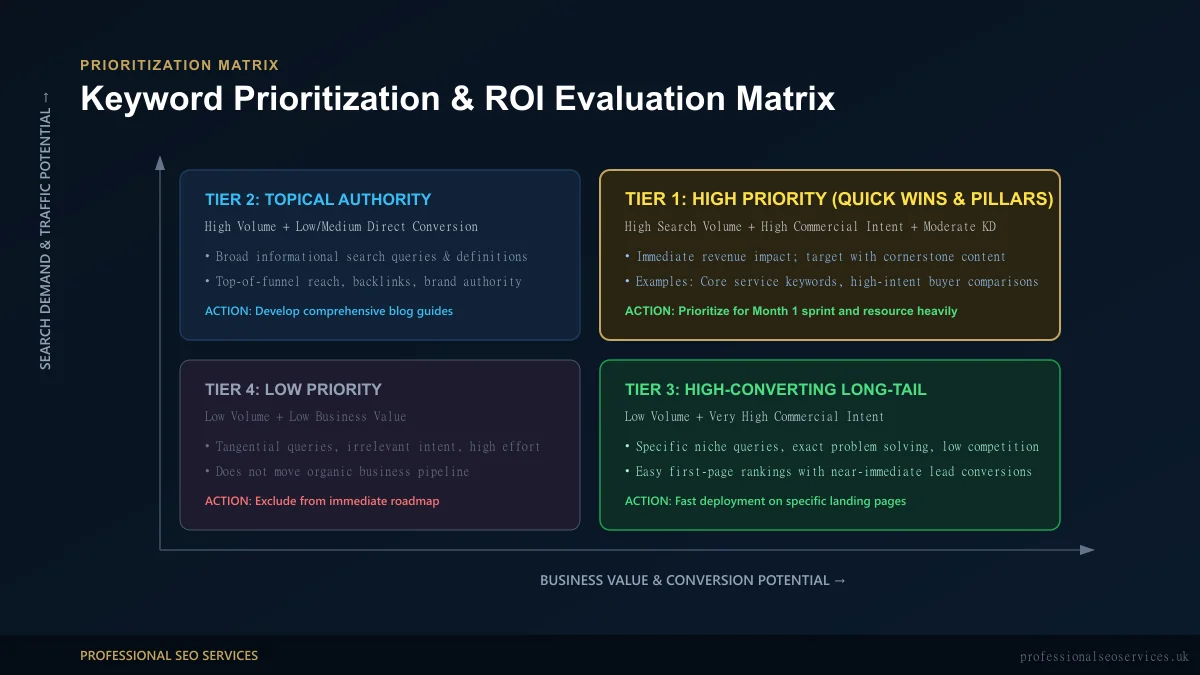
After completing the research process, you will likely have a master list containing hundreds of potential keywords. You cannot target them all simultaneously. A rigorous prioritization framework separates game-changing revenue drivers from low-impact distractions.
High-priority keywords
Characteristics: High business relevance, commercial or transactional intent, achievable keyword difficulty, and clear conversion pathways.
Action: Allocate these to Sprint 1. Build cornerstone service landing pages or authoritative pillar guides immediately.
Medium-priority keywords
Characteristics: Moderate search demand, informational intent, supportive topic cluster queries, and moderate difficulty.
Action: Schedule these into your regular editorial calendar for Month 2 and Month 3. These will build the topical authority required to support your high-priority commercial pages.
Low-priority keywords
Characteristics: Unrealistic keyword difficulty (requiring hundreds of backlinks you do not possess), ambiguous search intent, or weak business relevance.
Action: Archive these in your backlog. Re-evaluate once your domain authority and content foundation have matured.
How to Build a Keyword Research Spreadsheet
To turn raw search data into an actionable SEO roadmap, compile your findings into a structured master spreadsheet (in Google Sheets or Excel).
Structure your spreadsheet with the following recommended columns:
- Keyword: The specific search query string.
- Keyword Type: Informational, Commercial, Transactional, Navigational, Local.
- Search Intent: User's underlying goal (e.g., “Learn how to execute step-by-step”).
- Search Volume: Monthly average searches.
- Keyword Difficulty (KD%): Ranking difficulty score (0–100).
- CPC (£/$): Cost per click advertising value.
- Traffic Potential: Monthly organic visits won by the #1 ranking URL.
- Business Value: Tier 1 (High), Tier 2 (Medium), Tier 3 (Low).
- Parent Topic / Cluster: The broader topic cluster (e.g., “Keyword Research”).
- Role: Primary Target vs. Secondary LSI Query.
- Existing URL: Current ranking page on your site (if applicable).
- Target URL Slug: The designated URL assigned to this cluster.
- SERP Features: PAA, Featured Snippet, AI Overview, Video, Local Pack.
- Competitor Benchmark: Top competitor URL currently dominating the query.
- Priority Status: P1 (Immediate), P2 (Next Quarter), P3 (Backlog).
- Content Status: Not Started, In Progress, Review, Published, Live & Indexed.
Keyword Research Example: From Seed Keyword to Content Plan
Let us demonstrate the entire methodology in action using a real-world case study for a B2B organic search consultancy.
- Seed Keyword: We start with the foundational root:
SEO keyword research. - Tool Expansion: We enter the seed into Semrush and Ahrefs, generating 1,840 variations. Key discovered terms include: “how to do keyword research”, “keyword research for seo”, “keyword research tools”, “how to find seo keywords”, “keyword research process”, “long-tail keywords”, and “keyword clustering”.
- Intent & SERP Analysis: We analyze the SERP for “how to do keyword research”. Google displays comprehensive 3,500+ word guides with step-by-step headings, comparison tables, and diagrammatic visuals. Intent is 100% educational and comprehensive.
- Clustering: We recognize that “how to do keyword research” and “keyword research for seo” share 8 out of 10 ranking URLs. We group them into a single primary cluster rather than creating separate pages.
- URL Assignment: We map this cluster to the permanent slug:
/blog/how-to-do-keyword-research/. - Content Brief Creation: We outline every H2 and H3 to cover seed extraction, tool walk-throughs, intent classification, clustering rules, CMS implementation, and common mistakes.
- Publishing & Monitoring: We publish the article with structured JSON-LD schema, compressed WebP diagrams, and monitor Search Console for early impression spikes across long-tail terms.
Common Keyword Research Mistakes to Avoid
Even experienced marketing teams fall victim to common pitfalls that sabotage organic performance. Avoid these critical errors:
Choosing keywords based only on search volume
Chasing high-volume head terms while neglecting commercial intent results in high bounce rates and zero conversions. Always evaluate commercial intent before search volume.
Ignoring search intent
Publishing a commercial sales page for an informational query—or a blog post for a transactional query—guarantees your URL will never rank on page one.
Targeting keywords unrelated to the business
Publishing viral pop-culture articles that attract millions of visits unrelated to your core service dilutes your domain's topical authority and wastes crawl budget.
Treating keyword difficulty as an absolute ranking barrier
Keyword difficulty is a third-party software estimate based primarily on backlinks. If you produce a genuinely superior, original resource backed by deep topical authority, you can routinely outrank high-KD competitors.
Creating a separate page for every keyword variation
Creating “how to do keyword research”, “how to conduct keyword research”, and “how to perform keyword research” as three separate pages will trigger severe keyword cannibalization.
Targeting the same keyword cluster on multiple URLs
Competing against yourself confuses search engine crawlers and splits your backlink equity across multiple URLs.
Ignoring long-tail queries
Dismissing queries with 50 to 200 monthly searches deprives your business of the highest-converting, lowest-competition traffic available.
Ignoring existing Search Console data
Failing to review Google Search Console means overlooking hundreds of real queries Google is already attempting to rank your site for.
Stuffing keywords into content
Awkwardly repeating exact-match terms alienates human readers and triggers Google’s algorithmic spam filters.
Hiding keywords on a page
Using hidden CSS text or zero-pixel font sizes is a direct violation of Google Webmaster guidelines that leads to permanent manual actions.
Using outdated meta keywords
Google officially abandoned the <meta name="keywords"> tag in 2009. Including it provides zero SEO benefit and exposes your target keywords to competitors.
How to Use Keywords Without Keyword Stuffing
Modern search optimization requires balancing algorithmic relevance with frictionless user readability.
What is keyword stuffing?
Keyword stuffing is the outdated, manipulative practice of overloading a webpage with target keywords, numbers, or repetitive phrases in an attempt to artificially manipulate search rankings. It results in unnatural, repetitive prose that degrades user experience.
How many times should a keyword appear?
There is no prescribed “keyword density” percentage. Search algorithms do not count whether your keyword appears at 1.5% or 2.8%.
Instead, ensure your primary keyword appears:
- Once in your Title Tag and H1.
- Once in your introductory section.
- Once or twice in major subheadings (H2).
- Naturally throughout the body copy wherever grammatically logical.
How to use keywords naturally
Focus entirely on topical completeness and conceptual depth:
- Use natural language and conversational phrasing.
- Address user questions comprehensively.
- Incorporate related concepts and technical terminology naturally.
- Use bullet points, comparison tables, and diagrams to make information scannable.
Advanced Keyword Research for Topical Authority
To win competitive organic markets, you must transition from individual page optimization to building sitewide topical authority.
Build topic clusters
Organize your content into interconnected hub-and-spoke architectures:
The Pillar-Cluster Framework:
Pillar Page (Core Hub): A comprehensive, high-level guide covering the broad topic (e.g., How to Do Keyword Research).
Subtopic Clusters (Spokes): In-depth articles addressing specific sub-queries (e.g., Keyword Difficulty Guide, Search Intent Mapping, Ecommerce Keyword Research).
Contextual Internal Links: Bidirectional hyperlinks connecting cluster articles back to the main pillar, signaling topical mastery to search algorithms.
Use query fan-out
Query fan-out is the retrieval mechanism where an AI system or search algorithm splits a single broad user prompt into multiple related sub-inquiries to construct a comprehensive answer.
Anticipate query fan-out by expanding your primary topic across 12 analytical dimensions:
Build entity relationships
Connect named entities throughout your document: associate industry tools (Ahrefs, Semrush), technical standards (JSON-LD Schema), industry pioneers, and algorithm updates (BERT, Helpful Content System) to reinforce domain relevance.
Use competitor content to discover missing subtopics
Compare the heading structures of the top 3 ranking competitors side-by-side. Identify subtopics, statistical benchmarks, or practical workflows that competitors have omitted, and make those missing elements the cornerstone of your page.
Turn keyword research into topical coverage
The ultimate objective of keyword research is not to build the longest spreadsheet; it is to create the most authoritative, helpful, and exhaustive destination on the web for that topic.
How to Measure Whether Your Keyword Research Is Working
Track these vital metrics over a 3-to-6 month horizon to evaluate performance:
- Organic impressions: The earliest leading indicator. A surge in Search Console impressions indicates Google has indexed your semantic entities.
- Total ranking queries: The breadth of queries your page ranks for. Healthy pages expand from ranking for 10 queries to ranking for hundreds.
- Organic clicks & CTR: Sustained click growth confirms your title tags and meta descriptions are capturing searcher interest.
- Average ranking position: Tracking the gradual climb of your primary keyword from page three to page one.
- Non-branded organic traffic: Growth in new prospective customers discovering your brand via generic industry queries.
- Conversions & Pipeline Revenue: Qualified leads, strategy audit requests, and product checkout sales originating from organic search. For comprehensive measurement frameworks, see our guide on How to Measure SEO Performance.
Keyword Research FAQ
Final Keyword Research Checklist
Use this actionable checklist to execute every stage of your organic search research flawlessly:
- ✔ Define business goals: Clarify profit centers, target geography, and conversion expectations.
- ✔ Define target audience: Document customer pain points, buying stages, and vocabulary.
- ✔ Identify seed keywords: Brainstorm 5 to 10 foundational root terms from your service catalog.
- ✔ Expand keyword ideas: Use Semrush, Ahrefs, and Google Keyword Planner to discover variations.
- ✔ Analyze competitors: Conduct a keyword gap audit to uncover competitors' ranking phrases.
- ✔ Identify search intent: Classify queries into Informational, Commercial, Transactional, or Navigational.
- ✔ Analyze SERPs: Inspect the top 10 results in Google to verify page format expectations.
- ✔ Review search volume: Evaluate relative monthly search demand.
- ✔ Review keyword difficulty: Assess whether your domain can legitimately compete on page one.
- ✔ Check traffic potential: Evaluate the total organic traffic won across all secondary terms.
- ✔ Find long-tail keywords: Target high-intent question queries via Autocomplete and PAA boxes.
- ✔ Find related keywords: Collect natural synonyms, modifiers, and regional variations.
- ✔ Identify entities: Extract Knowledge Graph entities, related concepts, and technical terms.
- ✔ Cluster keywords: Group queries based on shared SERP overlap and identical intent.
- ✔ Map keywords to URLs: Assign exactly one primary keyword per URL to prevent cannibalization.
- ✔ Prioritize opportunities: Focus on Tier 1 quick wins and core service pages first.
- ✔ Create content briefs: Outline H2/H3 headings, semantic entities, and featured snippet targets.
- ✔ Optimize pages naturally: Add keywords to title tags, H1s, introductory copy, and image alt text.
- ✔ Monitor Search Console: Track initial impressions, CTR adjustments, and page-two opportunities.
- ✔ Update keyword strategy: Refresh content every 6 to 12 months based on live performance data.
Conclusion
Effective keyword research is never about collecting the largest possible spreadsheet of search terms. It is about deeply understanding search demand, consumer psychology, and algorithmic intent, and translating those insights into a cohesive content architecture that serves real human needs.
By grounding your research in real business objectives, ruthlessly validating search intent against live Google SERPs, grouping queries into semantic topic clusters, mapping terms to unique URLs, and weaving keywords naturally into helpful content, you transform organic search from an unpredictable gamble into your company's most reliable, compounding growth engine.
Take action today: Begin with Step 1 by defining your core commercial goals, extract your seed keyword taxonomy, and audit your competitors to claim the organic search visibility your brand deserves.