
The question of whether are 404s bad for SEO represents an evaluation of how Hypertext Transfer Protocol (HTTP) 404 Not Found status codes interact with search engine crawling, indexation, and authority preservation across a domain. Search engines like Google and Bing encounter 404 responses when a requested Uniform Resource Locator (URL) does not exist on a web server.
Evaluating whether are 404s bad for SEO provides 3 primary benefits for website owners: it protects link equity from disappearing into dead links, it prevents crawl budget waste on non-existent endpoints, and it maintains a frictionless customer journey that supports conversions.
Website administrators deploy this diagnostic evaluation during platform migrations, catalog cleanups, CMS updates, and quarterly technical audits executed through professional agencies such as Professional SEO Services.
The foundational components of this analysis comprise 4 technical pillars: response header validation, Google Search Console (GSC) indexation reporting, server access log inspection, and custom 404 page optimization. In this complete breakdown, we examine the true mechanics of 404 status codes, dissect Google's official statements, compare hard 404s against soft 404s and 410 codes, and outline step-by-step resolution playbooks.
What Is a 404 Error?
A 404 error is a standard client-side HTTP status code indicating that the web server cannot locate the requested URL. When a web browser or a search bot like Googlebot requests a file, webpage, or resource, the server transmits a 3-digit numeric code in the HTTP response header. Code 404 confirms that communication with the host server succeeded, but the specific resource at that address does not exist.
There are 4 common triggers that produce a 404 response on modern websites:
- Deleting a webpage or product listing without configuring a forward destination.
- Typing an incorrect URL string directly into the address bar or query box.
- Linking internally to a misspelled or mistyped destination URL within page templates.
- Restructuring directory paths or domain structures without applying corresponding server rewrite rules.
Understanding this HTTP status code establishes the foundation for analyzing its genuine performance consequences in organic search. For a complete background on search crawler behavior, review our foundational SEO Guide.
Are 404s Bad for SEO?
No, 404 errors are not inherently bad for site-wide SEO rankings. Google has stated repeatedly that 404 status codes represent a normal, expected function of the World Wide Web. Search engines do not penalize a domain simply because dead or deleted URLs return a 404 header.
In industry discussions covered across Search Engine Land and community roundtables, Google search advocate John Mueller explained why 404s don't matter for SEO at a macro domain level. Google clarified that 404 and 410 response codes are not negative quality signals. When an invalid URL returns a 404, Googlebot recognizes that the page is gone and systematically drops the address from indexation.
Be clear 404s 410s are standard web protocols designed to communicate missing assets. As Mueller noted, "404: URL doesn't get indexed; it's an invalid URL, so this is fine. Just to be clear: 404s/410s are not a negative quality signal. It's how the web is supposed to work."
However, 404 errors become harmful to SEO performance under 3 specific operating conditions:
- Losing earned link equity when high-authority external backlinks point to a dead 404 URL.
- Disrupting user navigation when critical conversion pages or checkout paths break.
- Generating internal linking damage when live indexable pages link into 404 endpoints.
How Do 404 Errors Affect SEO?
404 errors affect SEO through link equity loss, search index removal, user experience friction, and crawl efficiency allocation. While a solitary missing page does not harm adjacent rankings, widespread unresolved broken links undermine your organic search ecosystem in 4 measurable ways:
1. Loss of Backlink Equity and Page Authority
When an external website links to a URL on your domain that serves a 404 header, the page authority and PageRank passed by that backlink are wasted. Search engines cannot pass link equity through an unindexed, broken endpoint. Reclaiming this link equity requires matching the missing URL to a relevant live replacement.
2. De-Indexation from Search Results
Googlebot stops displaying a URL in Search Engine Result Pages (SERPs) once the server confirms that the address returns a persistent 404 status code. If a high-ranking revenue page mistakenly returns a 404 error code due to a server misconfiguration, its organic impressions, clicks, and rankings vanish immediately.
3. User Experience and Conversion Rate Degradation
Encountering a generic "404 Not Found" browser screen causes 73% of prospective customers to leave the domain immediately. This abrupt bounce terminates the customer journey, reducing organic conversion rates and damaging engagement signals that modern ranking algorithms evaluate.
4. Internal Crawl Bottlenecks
If your internal site architecture contains hundreds of broken links embedded in navigation menus, footer templates, or body copy, search engine crawlers expend processing capacity fetching dead addresses rather than discovering newly published content assets.
When Should You Fix a 404 Error?
You should fix a 404 error when the missing URL contains valuable external backlinks, receives significant organic traffic, represents an active business offering, or is targeted by internal links. You should fix 404s like when high-intent buyers or search bots encounter broken paths that interrupt commercial value.
Implement a fix immediately under these 5 operational scenarios:
- The URL was deleted by mistake: Restore the page or publish an updated version at the identical URL string to reclaim historical rankings.
- The URL holds authoritative backlinks: Implement a 301 permanent redirect pointing the dead URL to the closest relevant live equivalent page to retain backlink equity.
- The URL generates direct or referral traffic: Redirect the address to ensure incoming visitors land on relevant content rather than an error message.
- The URL is linked internally: Update the live anchor links across your templates and editorial copy so links point directly to active 200 OK destinations.
- The URL represents a moved product or category: Redirect the old product URL to the newest model, replacement SKU, or immediate parent category.
When fixing complex site migrations or deep architectural restructuring, enlist dedicated Technical SEO Services to map redirect paths without creating redirect loops or latency bottlenecks.
When Should You Leave a Page as a 404?
You should leave a page as a 404 when the content is permanently discontinued, possesses no external backlinks, receives zero user traffic, and has no relevant equivalent URL on the website.
Allowing non-relevant URLs to return a clean 404 status code is natural and beneficial for your site architecture. John Mueller of Google explained why 404s don't matter for SEO in such scenarios: forcing irrelevant redirects degrades user trust and creates soft-404 errors.
Leave a URL as a 404 under these 4 specific conditions:
- Old, thin blog posts pruned during content audits that have no topical equivalent.
- Parameterized URL strings generated by malicious bot scans or legacy CMS tracking tags.
- Decommissioned event landing pages with expired validity and zero search volume.
- Discontinued products where no similar replacement model or category exists.
What Is a Soft 404 and Why Is It Different?
A soft 404 is an error condition where a web server returns a standard HTTP 200 OK success header for a page that displays missing content, an error message, or an irrelevant redirect. Unlike a hard 404, which explicitly communicates a 404 status code in the HTTP header, a soft-404 misleads search crawlers by signaling that the URL is a healthy, indexable resource while presenting empty or thin content to users.
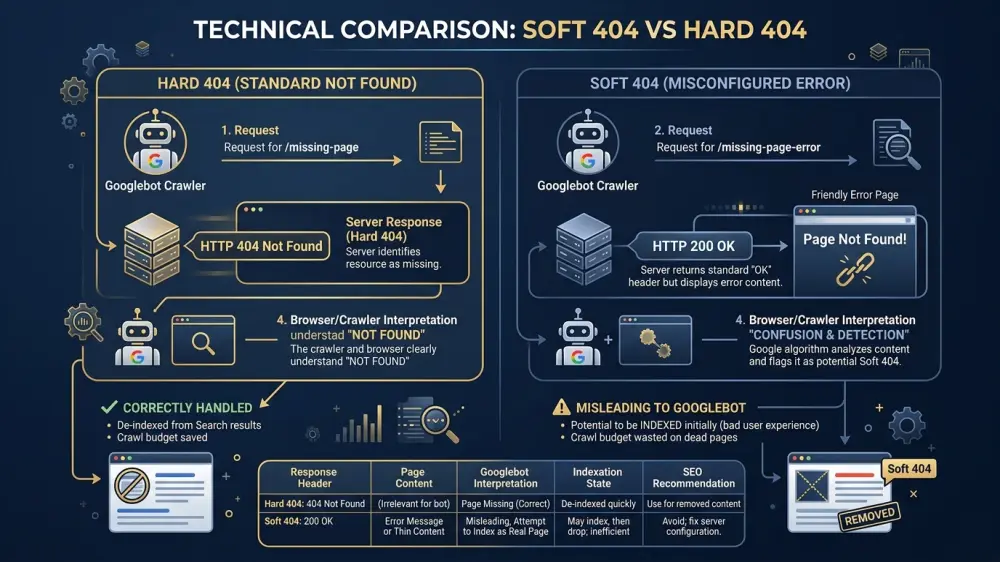
Google algorithms employ machine learning classifiers and natural language processing models to perform automated soft 404 detection. When Googlebot parses a page serving a 200 OK header with phrases like "Page Not Found", "Product Out of Stock", or an irrelevant homepage redirect, Google flags the URL as a soft 404 in Search Console and refuses to index it.
There are 4 common causes of soft 404 errors:
- Blanket homepage redirects: Redirecting all deleted URLs to your root domain (
https://example.com/) causes Google to flag them as soft 404s because the homepage is not equivalent to the missing content. - Empty category or search result pages: Serving 200 OK headers on category archives containing 0 items.
- Thin or broken template pages: Rendering header and footer shells without substantive body copy.
- Custom 404 templates misconfigured to return 200 OK: Serving visual 404 error designs without setting the underlying HTTP status header to 404.
| Attribute | Hard 404 (Standard) | Soft 404 (Misconfigured) |
|---|---|---|
| HTTP Response Header | HTTP/1.1 404 Not Found |
HTTP/1.1 200 OK (or 301 to irrelevant page) |
| Search Engine Action | De-indexes the URL cleanly and reduces crawl requests | Attempts to index, flags as Soft 404, wastes crawl bandwidth |
| Crawl Budget Impact | Negligible; crawler stops re-fetching quickly | High; crawler repeatedly fetches empty pages |
| Recommended Solution | Maintain 404 or apply relevant 301 redirect | Fix server configuration to return true 404 or 410 |
404 vs 410: Which HTTP Status Code Should You Use?
Use HTTP 404 when a page is temporarily missing or unknown, and use HTTP 410 when content has been intentionally and permanently removed with no planned return or replacement. Both codes tell search engines that the URL cannot be served, but their indexation timelines differ.
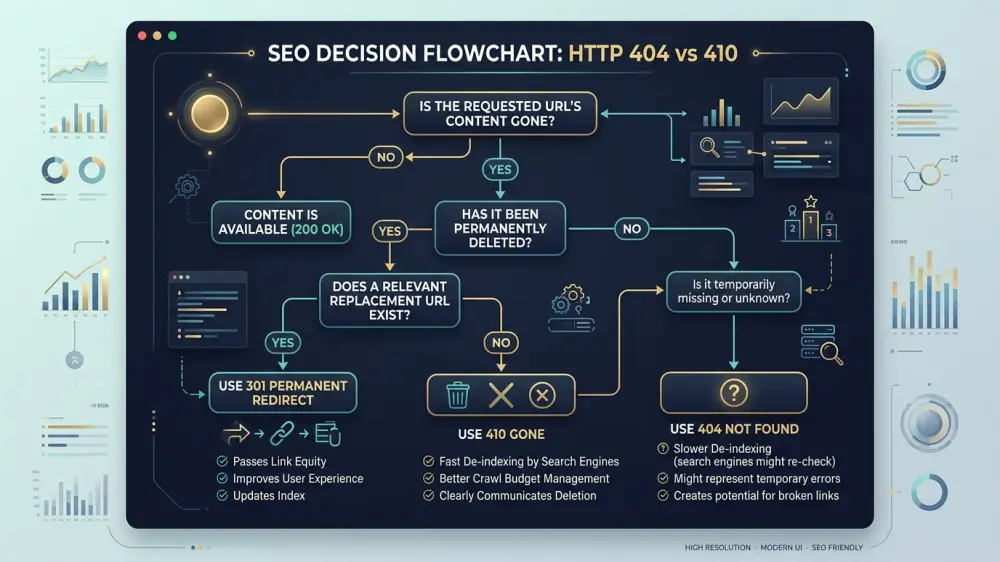
When Googlebot encounters a 404 Not Found response, the crawler marks the URL as temporarily missing and returns to re-crawl the page several times over 14 to 30 days (2 to 4 weeks) before de-indexing it completely. In contrast, when Googlebot encounters a 410 Gone response, the search engine interprets the instruction as permanent and purges the URL from the search index significantly faster.
Follow these 3 rules to choose between 404 and 410:
- Select 410 Gone: When permanently deleting large batches of obsolete URLs (such as thousands of discontinued catalog items or legacy blog archives) that you want removed from Google Search Console and indexation immediately.
- Select 404 Not Found: When a page is temporarily taken down for maintenance, or when handling random mistyped URLs requested by unauthorized crawlers.
- Select 301 Redirect: When an equivalent replacement page exists on the domain to transfer user intent and link equity.
How How to Find 404 Errors on Your Website
To find 404 errors on your website, combine Google Search Console indexation reports, desktop website crawler audits, and server log analysis. Using multiple audit tools ensures you identify both internal broken links and external referral 404s.

Execute these 4 proven methods for 404 error discovery:
Method 1: Google Search Console (Page Indexing Report)
Navigate to Indexing > Pages inside Google Search Console. Review the "Why pages aren't indexed" table and inspect 2 primary categories: "Not found (404)" and "Soft 404". Click into each category to view the list of affected URLs, sample discovery dates, and referencing sources.
Method 2: Technical Website Crawlers (Screaming Frog, Sitebulb, Ahrefs, SEMrush)
Run a complete site crawl using an SEO crawler. Filter the results by Response Codes > Client Error (4xx). Export the list of 404 URLs along with their exact inlink sources. This identifies the specific pages on your site that contain broken hyperlinks requiring immediate template updates.
Method 3: Raw Server Log Analysis
Perform server log analysis by filtering web server access logs (Apache, NGINX, IIS, Cloudflare) for HTTP response code 404. Log files reveal real-time 404 hits from search bots and human visitors that crawler tools cannot uncover, including broken links from external referring domains.
Method 4: Google Analytics 4 (GA4) Tracking
Configure a custom exploration in Google Analytics 4 (GA4) with Page Title filtering for your 404 page title (e.g., "Page Not Found"). This report highlights the exact broken URLs that real visitors land on, along with traffic volume and referring sources.
To learn how technical crawl metrics connect with broader SEO performance measurement, read our full guide on How to Measure SEO.
How to Fix 404 Errors for SEO
To fix 404 errors for SEO, implement a 4-step remediation framework: map high-value URLs to relevant 301 redirects, restore accidentally deleted content, update broken internal links, and allow obsolete pages to return clean 404 or 410 codes.
Execute these 4 remediation steps in order of priority:
Step 1: Apply 301 Permanent Redirects to Relevant Live Pages
Identify 404 URLs that possess external backlinks or historical organic rankings. Configure a server-level 301 permanent redirect in your .htaccess, NGINX configuration, or Cloudflare redirect rules. Point the old URL directly to the most semantically relevant live destination:
# .htaccess 301 Redirect Example
Redirect 301 /services/old-seo-service/ https://www.professionalseoservices.uk/services/technical-seo/
Step 2: Correct Internal Link References
Never rely on redirects to handle internal navigation links. Use your site audit export to locate every internal page that links to a 404 URL. Update the HTML source code directly so internal anchor tags point to the new, live 200 OK destination, eliminating unnecessary redirect hops.
Step 3: Recreate Accidentally Removed Content
If an authoritative guide or core product page was deleted accidentally during a site update, recreate the content at the original URL. Request re-indexing via the URL Inspection tool in Google Search Console to restore historical rankings.
Step 4: Remove Broken URLs from XML Sitemaps
Ensure your XML sitemaps only contain canonical, indexable 200 OK URLs. Submitting 404 URLs within an XML sitemap wastes crawl allocation and triggers warnings in Google Search Console.
For end-to-end site architecture optimization and audit execution, consult our in-depth Technical SEO Guide.
How to Create an SEO-Friendly 404 Page
To create an SEO-friendly 404 page, serve a correct HTTP 404 status code header while providing clear navigation links, an integrated search bar, helpful category pathways, and consistent website branding. An effective custom 404 page retains lost visitors and guides them toward conversion goals.
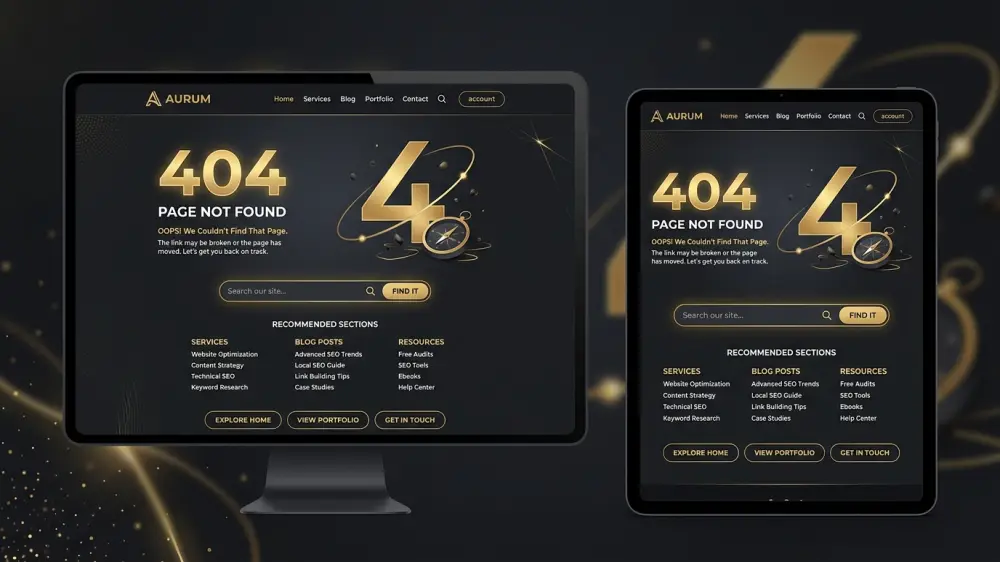
Include these 5 core design components on your custom 404 error template:
- Strict HTTP 404 Response Header: Ensure your server returns an authentic
404 Not Foundresponse code rather than a200 OKto prevent soft 404 errors. - Clear, Empathetic Messaging: Inform users plainly that the requested page cannot be found without technical jargon.
- Interactive Search Box: Embed a functional search bar allowing users to find specific products or articles immediately.
- Links to High-Priority Sections: Display links to your homepage, core service offerings, top categories, and contact page.
- Uniform Branding and Navigation: Maintain your standard site header, footer, and styling so visitors recognize they remain on your trusted domain.
Common 404 SEO Mistakes to Avoid
Common 404 SEO mistakes to avoid include redirecting all 404 URLs to the homepage, creating redirect chains, ignoring internal broken links, and blocking 404 URLs in robots.txt.
Avoid these 5 critical implementation errors:
- Redirecting Every 404 to the Homepage: Mass-redirecting deleted pages to the homepage confuses users and triggers automated soft 404 penalties from Google algorithms. Only redirect when a direct, relevant equivalent page exists.
- Blocking 404 Pages in Robots.txt: Adding a
Disallow: /error-page/rule prevents Googlebot from crawling the URL to detect the 404 header. Consequently, the deleted URL lingers in the search index longer. - Serving 200 OK on Error Pages: Displaying custom 404 visual designs while the web server returns a 200 OK response header causes soft 404 indexation bloat.
- Creating Multi-Hop Redirect Chains: Redirecting a 404 URL to an old URL that redirects again to a third destination slows down page load times and dilutes link equity. Always redirect directly to the final 200 OK destination.
- Neglecting External Backlinks on Broken URLs: Allowing high-authority URLs with backlinks from top industry publications to languish as 404s discards earned domain authority.
404 Errors vs Other HTTP Errors and SEO
404 client errors differ fundamentally from 3xx redirects, 403 forbidden errors, and 5xx server errors in their technical causes and SEO implications. Understanding the full spectrum of HTTP status codes ensures precise diagnostic troubleshooting.
| HTTP Code | Status Name | Technical Definition | Direct SEO Impact |
|---|---|---|---|
| 200 | OK | Standard successful response for requested resource. | Normal crawling and indexation. |
| 301 | Moved Permanently | Resource permanently transferred to a new target URL. | Passes ~99% link equity; updates Google index to new URL. |
| 302 | Found (Temporary) | Resource temporarily located at an alternate URL. | Retains original URL in index; does not pass full equity immediately. |
| 403 | Forbidden | Server understands request but refuses authorization. | Blocks Googlebot access; prevents indexing of intended content. |
| 404 | Not Found | Requested resource does not exist on the server. | De-indexes URL; no penalty to unrelated site rankings. |
| 410 | Gone | Resource permanently deleted with no replacement. | Accelerates de-indexation faster than 404. |
| 500 / 503 | Server Errors | Internal server failure or temporary server overload. | Severe SEO threat; persistent 5xx errors cause domain-wide ranking drops. |
In modern search environments influenced by AI Overviews and Large Language Models (LLMs), clean indexation and trusted content are essential. For brands developing an AI visibility strategy, ensuring that search crawlers parse authoritative source stacks without encountering broken links reinforces authority signals across the customer journey.
Conclusion
In conclusion, analyzing whether are 404s bad for SEO reveals that 404 status codes are a natural, standard component of web infrastructure rather than an automatic ranking penalty. Googlebot expects non-existent pages to return 404 headers and handles them without degrading domain-wide authority.
The main benefits of managing whether are 404s bad for SEO include preserving backlink equity, optimizing crawler efficiency, and delivering a smooth customer journey that protects conversion rates.
Marketing teams and web developers use this systematic evaluation to maintain clean site architectures during redesigns, migrations, and ongoing technical audits.
The primary components of 404 error management rely on Google Search Console indexation monitoring, server log inspection, precise 301 redirect mapping, and user-centric custom 404 page design. By maintaining a clean internal linking structure and preserving link equity on deleted URLs, you establish an agile technical SEO foundation that drives sustainable organic growth.
Frequently Asked Questions
Are 404 errors bad for SEO rankings on Google?
No, standard 404 errors are not inherently bad for site-wide SEO rankings on Google. Search engines view missing URLs as a natural operational function of the web. 404 errors only harm SEO performance when important URLs with valuable backlinks, active user traffic, or broken internal links return missing status codes.
Do 404 errors waste crawl budget?
No, 404 errors do not exhaust crawl budget on standard websites. Googlebot quickly reduces crawl frequency to missing endpoints once a server returns a confirmed 404 Not Found or 410 Gone status code. Crawl budget is only impacted when millions of duplicate parameterized soft 404 URLs are generated continuously.
Should all 404 errors be redirected to the homepage?
No, redirecting all 404 errors to the homepage is an SEO mistake. Google treats blanket homepage redirects of non-equivalent deleted pages as soft 404 errors, which discards link equity and creates a confusing customer journey for visitors.
What is the difference between a 404 Not Found and a 410 Gone status code?
A 404 Not Found status code indicates that a URL is currently missing and might return, while a 410 Gone status code declares that a URL is permanently deleted. Googlebot drops 410 URLs from the search index faster than 404 URLs.
How do you fix a 404 error that has valuable external backlinks?
To fix a 404 error with valuable external backlinks, implement a permanent 301 redirect. Point the broken URL to the most relevant equivalent live page or category on your domain to preserve link equity and authority signals.